 Docs Portal
Nuvolo Source

The Nuvolo Source connector imports Nuvolo CMMS Building, Floor, Space, asset-reference, and Work Order data into the Mapped Graph. It provisions a place hierarchy for selected Nuvolo buildings, polls Nuvolo Work Orders every minute, and supports on-demand historical backfill.
Use Cases
- CMMS visibility in Mapped: Bring Nuvolo Work Orders and place context into the graph so operations teams can query maintenance activity alongside other building systems.
- Portfolio-wide place standardization: Create a consistent building / floor / space hierarchy in Mapped from selected Nuvolo buildings.
- Cross-system Work Order correlation: Link Nuvolo Work Orders to people, assignment groups, places, and referenced assets so downstream applications can route and analyze maintenance activity.
Configuration
Auth Requirements
The connector authenticates to Nuvolo using OAuth password grant credentials. You must also provide the Nuvolo field keys used to carry shared sync metadata on Work Orders and assets.
| Field | Required | Description | Where to Find |
|---|---|---|---|
| Base URL | Yes | Your Nuvolo instance base URL | Your Nuvolo administrator (for example https://your-instance.service-now.com) |
| Client ID | Yes | OAuth client ID used for Nuvolo API access | Nuvolo / ServiceNow application registration or integration setup |
| Client Secret | Yes | OAuth client secret | Nuvolo / ServiceNow application registration or integration setup |
| Username | Yes | Nuvolo username with API access to buildings, spaces, Work Orders, users, and groups | Nuvolo administrator |
| Password | Yes | Password for the API user | Nuvolo administrator |
| Workorder Sync Token | Yes | Nuvolo Work Order field key that stores shared connector identity data | Nuvolo table / field configuration for the Work Order table |
| Asset Sync Token | Yes | Nuvolo asset field key that stores shared connector identity data | Nuvolo table / field configuration for the asset / device table |
After you save the Auth step, the connector validates the credentials against Nuvolo before allowing the remaining setup steps.
Place Mappings
After authentication, select one or more Nuvolo Buildings. The connector then generates mapping rows for the Building, its Floors, and its Spaces.
| Field | Required | Description |
|---|---|---|
| Selected Buildings | Yes | The Nuvolo buildings to include in location sync and Work Order sync |
| Building Site ID | Yes | The site identifier used to group buildings in Mapped |
| Building Name | Yes | Display name for the building in Mapped |
| Building Address | Yes | Postal address used for the building record |
| Sub-building Code | No | Optional sub-building grouping if you want an extra place layer |
| Sub-building Name | No | Optional display name for the sub-building |
| Floor Name | Yes | Floor display name |
| Floor Level | Yes | Numeric floor level used by Mapped |
| Space Name | Yes | Space display name |
| Space Code | Yes | Space code or room code |
| Space Exact Type | No | Optional Brick exact type for the space, such as Office or Work Station |
Notes:
- Mapping rows are generated from the selected Nuvolo buildings.
- Saving the mapping step starts a location sync.
- Spaces can also receive gross area in Mapped when Nuvolo provides area and area units.
Advanced Options
| Option | Default | Description |
|---|---|---|
| Polling Work Orders | Off | Enables or disables the scheduled Work Order poll |
| Historical Data Backfill | On-demand | Lets you sync older Work Orders by date range or by specific Work Order numbers |
Backfill notes:
- Date-range backfills longer than 7 days are processed in batches.
- Backfill does not change the regular polling schedule.
- The first scheduled poll only looks back a short recent window, so it's recommended to use backfill the firs time you set up the connector.
Mapped Concepts
API to Mapped Entities
| Nuvolo Record | Mapped Entity | Notes |
|---|---|---|
| Selected building | Building | Created from the place mapping table and tagged with Nuvolo building identities |
| Site ID from mapping | Site | Used as the parent container for buildings |
| Optional sub-building mapping | SubBuilding | Created only when you populate sub-building values |
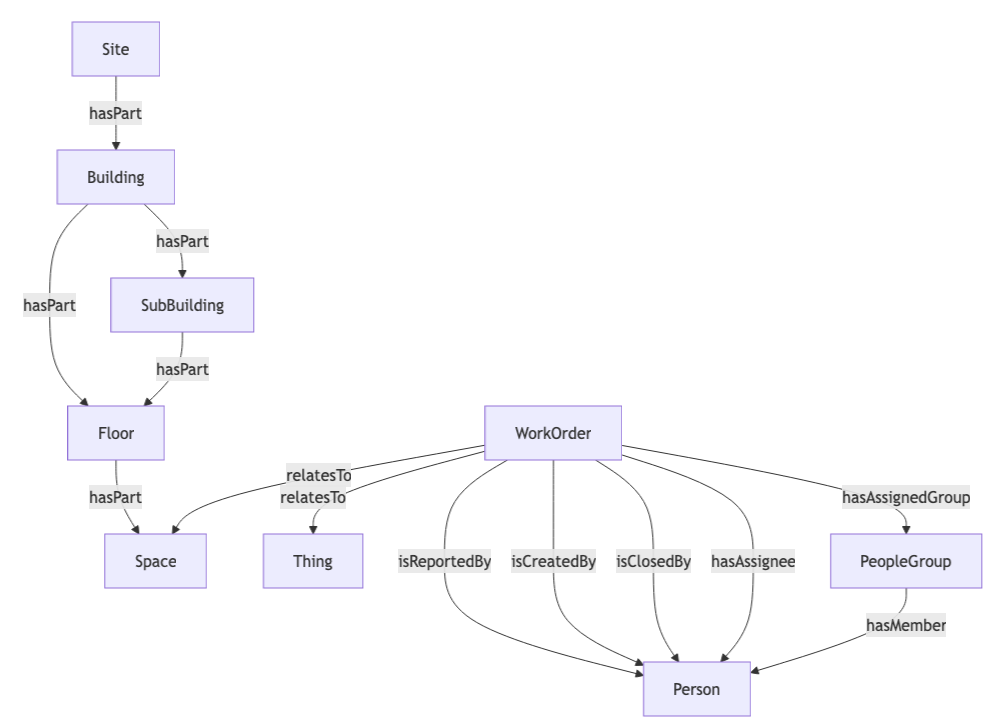
| Floor | Floor | Added beneath the building or sub-building |
| Space | Space | Added beneath the floor; may include gross area and an optional exact type |
| Facilities Work Order | WorkOrder | Includes summary, description, status, sub-status, priority, type, sector, due date, and close dates |
| Referenced Nuvolo user | Person | Created for reporter, creator, closer, and assignee when an email address is available |
| Assignment group | PeopleGroup | Created from the Nuvolo assignment group and linked to the assignee when applicable |
| Referenced asset / device | Thing | Created as an asset reference for Work Orders that point to a Nuvolo asset |
Work Order relationship behavior:
- Place relationships use Nuvolo building / space identities so Work Orders can resolve to the matching place in your graph.
- Asset relationships create a Thing reference for the Nuvolo asset tied to the Work Order.
- People and group relationships add reporter, creator, closer, assignee, and assignment group context to each Work Order.
Sample Code
Query Work Orders
Read more about how to query Work Orders in the Mapped Graph.
Request ResponseCopy1 2 3 4 5 6 7 8 9 10 11 12 13 14 15 16 17 18 19 20 21 22 23 24 25 26 27 28 29 30 31 32 33 34 35 36 37 38 39 40 41 42 43 44 45 46 47 48 49 50 51 52 53 54 55 56 57 58 59 60 61 62 63 64 65 66 67 68 69 70 71 72 73 74 75 76 77 78 79{ workOrders(filter: {connectedDataSourceId: {eq: "your-connector-Id"}}) { id name mappingKey summary description jobStatus jobSubStatus jobPriority jobType sector dueDate dateClosed externalDateCreated externalDateUpdated problemDescription resolutionDescription isReportedBy { name emails { address } } isCreatedBy { name emails { address } } isClosedBy { name emails { address } } hasAssignee { name emails { address } } hasAssignedGroup { name hasMember { name } } relatesTo { __typename ... on Building { id name } ... on Floor { id name level } ... on Space { id name exactType } ... on Thing { id name exactType } } identities { __typename ... on ExternalIdentity { value scope } } } }
Graph Diagrams