AiM Asset Management Source

The AiM Asset Management Source connector imports mapped place hierarchy data, assets, and work orders from AiM into the Mapped graph. It supports:
- Place synchronization from configured place mappings
- Asset synchronization using configurable asset-group-to-exact-type mappings
- Scheduled work order polling
- On-demand historical work order backfill (date range or specific proposal numbers)
Use Cases
- Sync AiM buildings, floors, and spaces into Mapped for place-aware operations.
- Bring AiM asset inventory into Mapped as Thing entities with mapped exact types.
- Keep maintenance records current by polling recently updated AiM work orders.
- Backfill historical or specific proposal-based work orders for reporting and analysis.
Configuration
Auth Requirements
The connector authenticates directly to AiM with username/password and a base URL.
| Field | Required | Description |
|---|---|---|
| Username | Yes | AiM API username |
| Password | Yes | AiM API password |
| Base URL | Yes | AiM API base URL for your environment |
Select Buildings
After authentication, the connector loads buildings, floors, and spaces from AiM and presents a place mapping table.
| Field | Required | Unique | Notes |
|---|---|---|---|
| building.siteId | Yes | No | Required to provision building hierarchy |
| building.name | Yes | No | Building display name |
| building.address | Yes | No | Building address |
| floor.name | Yes | No | Floor name (read-only from source data) |
| floor.level | No | No | Optional floor level |
| space.name | Yes | No | Space name (read-only from source data) |
| space.refId | Yes | Yes | Space identifier used for location linkage |
| space.code | No | No | Optional space code |
Saving this section triggers Location Sync, which will attach AiM Source identifiers to the relevant entities via ExternalIdentity.
Asset Mappings
The connector discovers AiM assetGroup values and lets you map each to a Mapped exact type for Thing.
- Saved mappings are stored under the connector config and used by Asset Sync and work-order-related asset linking.
- If no explicit mapping is selected, the asset defaults to THING.
- Saving this section triggers Asset Sync, which will import the assets from AiM Source.
Poll
Disabled by default, toggle to Enabled to poll for AiM Work Orders every 15 minutes, within the scope of selected Buildings.
Historical Data Backfill
Use this section to backfill historical Work Orders from AiM. You can backfill by date range, which will poll Work Orders by their date last created or update, or by specific AiM Source proposal numbers. Backfills a maximum of 50,000 entities.
Mapped Concepts
| AiM Data | Mapped Entity | Notes |
|---|---|---|
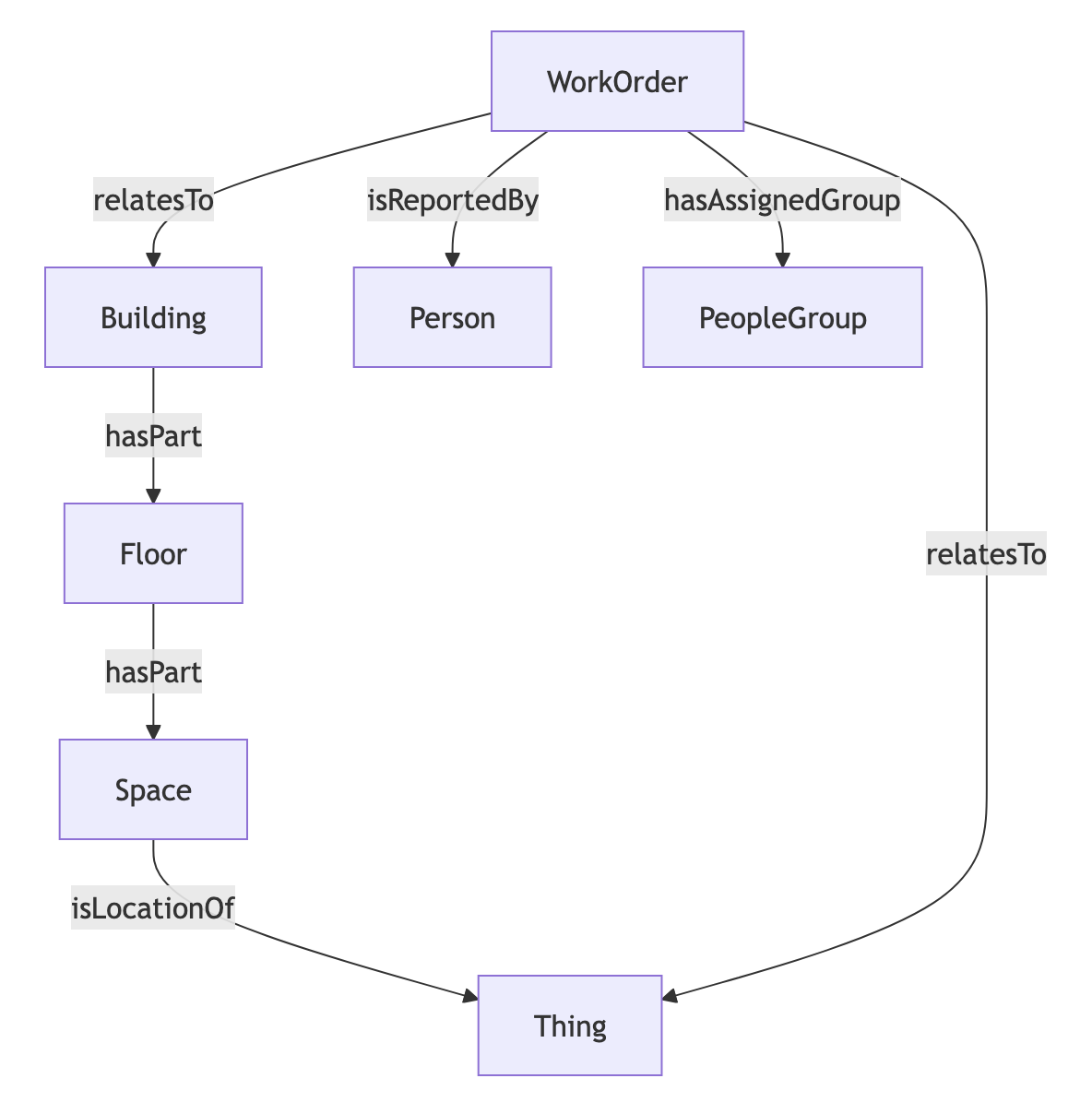
| Building mapping row | Building | Includes identities with AiM building URN when building.refId exists |
| Floor mapping row | Floor | Nested under building via hasPart; includes identity when floor.refId exists |
| Space mapping row | Space | Nested under floor via hasPart; includes AiM space URN identity |
| Asset record | Thing | Created from asset sync; exact type from Asset Mappings, fallback THING; linked by location (isLocationOf) |
| Work order record | WorkOrder | Includes status/type/priority/date fields and AiM work order identity |
| Contact email/name | Person (+ Email) | Work order reporter relationship via isReportedBy |
| Shop value from phase data | PeopleGroup | Linked to work order via hasAssignedGroup |
Poll
Enable or disable the Work Order poll on the Advanced Settings tab. The poll will regularly scan the AiM system for new or updated work orders submitted for the locations configured in the Select Buildings section.
Sample Code
You can query Work Orders by the connector's ID and identify related assets and places.
{
workOrders(filter: {connectedDataSourceId: {eq: "CONDUfL5cDFx4u7VVE8QMDvsH"}}) {
  id
  name
  dateCreated
  relatesTo {
    ... on Thing {
      id
      name
      exactType
    }
    ... on Building {
      id
      name
      exactType
    }
  }
}
}
Graph Diagram