Aruba Central Source

Aruba Central Source connects to HPE Aruba Networking Central to sync floor-level WiFi occupancy counts and network device online/offline status into Mapped. The connector provisions floor occupancy zones, creates optional device inventory for selected access points, switches, and gateways, and refreshes both data streams every 5 minutes. Note this connector uses GreenLake / HPE SSO unlike the legacy version.
Use Cases
- Monitor floor occupancy trends using WiFi client counts
- Detect offline network devices that may impact building operations
- Combine occupancy and device health data in one graph for dashboards and workflows
Configuration
Auth Requirements
| Field | Required | Description | Where to Find |
|---|---|---|---|
| Base URL | Yes | Aruba Central cluster URL used for API calls | Aruba Central cluster/region for your tenant |
| Client ID | Yes | OAuth client credential ID | Aruba Central or HPE GreenLake API credential setup |
| Client Secret | Yes | OAuth client credential secret | Generated with the client ID |
The connector authenticates with OAuth2 client credentials against Aruba Central and stores the current access token automatically.
Place Mappings
The Place Mapping step loads sites, buildings, and floors from Aruba Central. Users confirm the hierarchy and add any missing business context before provisioning.
| Field | Required | Editable | Description |
|---|---|---|---|
| Building Name | Yes | No | Building name returned by Aruba Central |
| Building Address | Yes | Yes | Customer-supplied street address for the building |
| Building Ref ID | Yes | No | Aruba building ID used for device location matching |
| Aruba Site ID | Yes | No | Stored as building context and used for occupancy/device API filtering |
| Sub-building Name | No | Yes | Optional subdivision for wings or towers |
| Sub-building Code | No | Yes | Optional short code for the sub-building |
| Floor Name | Yes | Yes | Display name for the floor |
| Floor Level | Yes | Yes | Numeric floor level |
| Floor Ref ID | Yes | No | Aruba floor ID used by provisioning and polling |
Enumerations
After saving place mappings, the Device Status tab devices at the mapped Aruba sites. Users choose which rows to monitor for online/offline status. Each saved selection records the device serial number, device type, site, and any available building/floor location IDs.
Supported device categories are:
- IAP — provisioned as a wireless access point
- SWITCH — provisioned as an ethernet switch
- GATEWAY — provisioned as a generic networked device
Advanced Options
| Option | Default | Description |
|---|---|---|
| Poll Occupancy | TRUE | Enables or disables floor occupancy polling |
| Poll Device Status | TRUE | Enables or disables device status polling |
Mapped Concepts
API to Mapped Entities
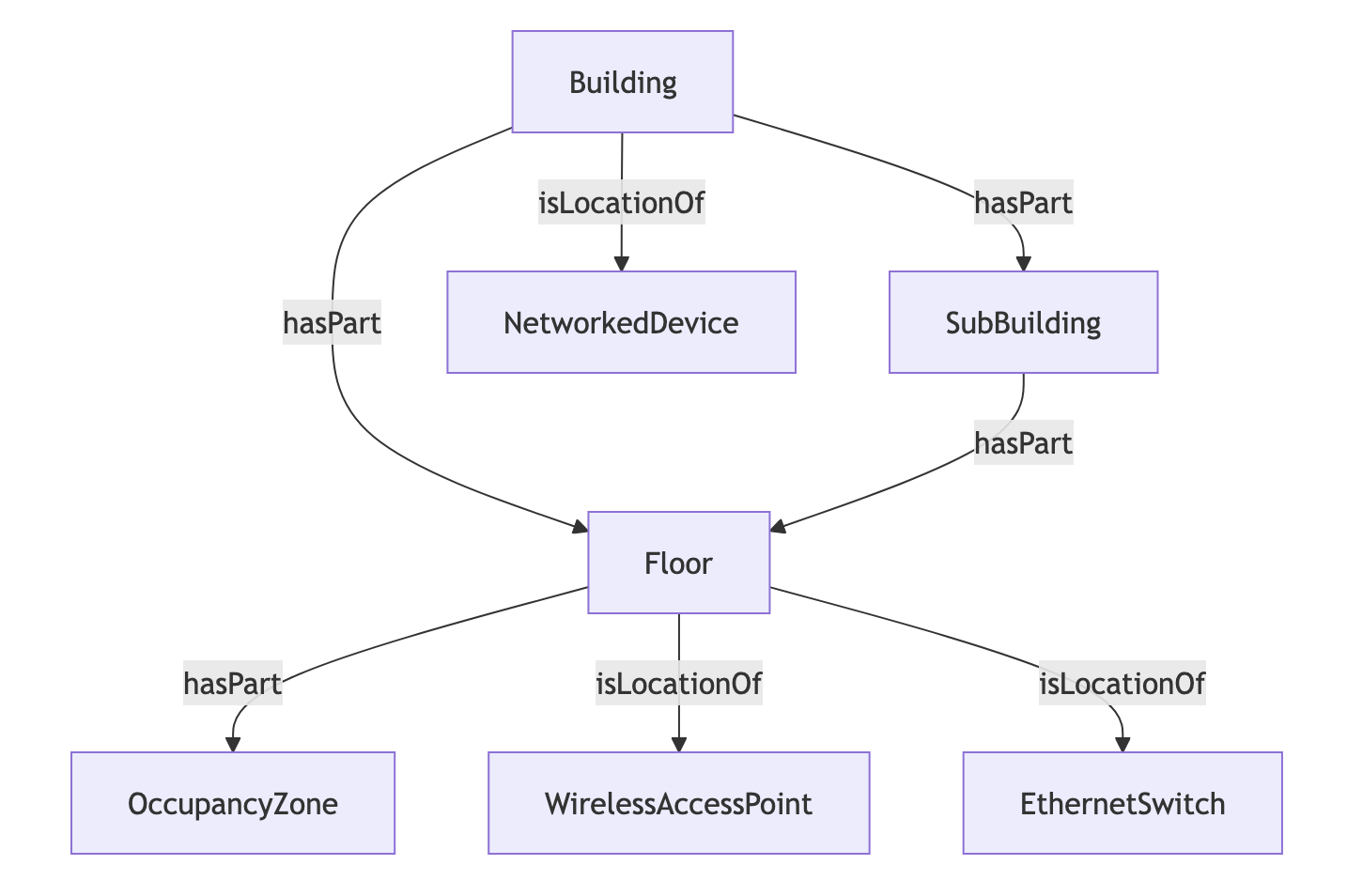
This connector creates a place hierarchy from Aruba Sites/Buildings/Floors, adds one Occupancy Zone per mapped floor, and optionally provisions selected Aruba devices with a status point.
| Aruba concept | Mapped entity | exactType | Relationships |
|---|---|---|---|
| Building from site map | Building | Building | Parent place in the hierarchy |
| Optional sub-building | Building | Building | hasPart from building, isPartOf to building |
| Floor from site map | Floor | Floor | hasPart from building or sub-building |
| Virtual floor occupancy area | Zone | OccupancyZone | hasPart from floor |
| Selected access point | Thing | WirelessAccessPoint | hasLocation to floor or building |
| Selected switch | Thing | EthernetSwitch | hasLocation to floor or building |
| Selected gateway | Thing | NetworkedDevice | hasLocation to floor or building |
API to Mapped Points
| Aruba data | Point location | exactType | Datatype | Unit | Description |
|---|---|---|---|---|---|
| /network-services/v1/wifi-clients-locations total count | Floor occupancy zone | OccupancyCountSensor | INT | — | Current WiFi client count for the mapped floor |
| /network-monitoring/v1/clients failed-device result | Selected device | Point | INT | — | 1 when the device is not in the failed list, 0 when it is |
Occupancy and device status polls both run every 5 minutes when enabled.
Sample Code
Query Aruba Central devices
{
  things(filter: { connectedDataSourceId: { eq: "your-connector-Id" } }) {
	    id
	    name
	    exactType
	    mappingKey
	    hasLocation {
	      ... on Building {
	        id
	        name
	        exactType
	      }
	      ... on Floor {
	        id
	        name
	        exactType
	      }
	    }
	    hasPoint {
	      id
	      name
	      exactType
	      mappingKey
	    }
	  }
}
Query Aruba Central Occupancy Zones
{
  zones(filter: { connectedDataSourceId: { eq: "your-connector-Id" } }) {
	    id
	    name
	    exactType
	    mappingKey
	    hasPoint {
	      id
	      name
	      exactType
	      mappingKey
	    }
	  }
}
Query Time Series for On Off Status and Occupancy Count Sensors
{
  points(filter:{connectedDataSourceId:{eq:"your-connector-Id"}}) {
	    id
	    name
	    exactType
	    mappingKey
	    isPointOf {
	      ...on Zone {
	        id
	        name
	        exactType
	        mappingKey
	      }
	      ...on Thing {
	        id
	        name
	        exactType
	        mappingKey
	      }
	    }
	    series(latest:true) {
	      timestamp
	      value {
	        int64Value
	      }
	    }
	  }
}
Graph Diagrams