AVEVA Insight

The AVEVA Insight connector integrates with AVEVA Insight (formerly Wonderware Online) Historian to bring electrical energy and power monitoring data into the Mapped graph. The connector retrieves time-series data from configured historian tags and creates electrical metering entities with their associated sensors at the building level.
Use Cases
Potential use cases include:
- Energy Monitoring & Analytics: Track cumulative electrical energy consumption across buildings to identify usage patterns and optimization opportunities.
- Real-time Power Monitoring: Monitor instantaneous electrical power demand to detect anomalies, manage peak loads, and improve operational efficiency.
- Building Portfolio Benchmarking: Compare energy and power metrics across multiple buildings within your portfolio for performance assessment.
Mapped Configuration
You will need an API token to authenticate with the AVEVA Insight Historian API. This token should have read permissions for the historian tags you wish to monitor.
Enter the token in the Auth section of the connector configuration. The connector will validate the token by querying the Historian API before proceeding.
The connector uses place mappings to associate historian tags with buildings in your Mapped graph. Under the Mapping tab in the connector configuration, the connector will retrieve available tags from the Historian API (filtered to energy and power-related metrics) for mapping.
In order to select a place mapping, all these fields much be completed in a row in the place mapping table:
- thing.refId - The fully qualified name (FQN) of the historian tag (must be unique). The connector retrieves this information.
- thing.name - Display name for the meter
- building.siteId - Identifier for the site containing the building
- building.address - Building address for spatial mapping
- building.name - Building name for reference
The connector automatically classifies tags based on their naming convention:
- Tags ending in .KWatts are treated as instantaneous power sensors
- Tags ending in .Energy are treated as cumulative energy sensors
Mapped Concepts
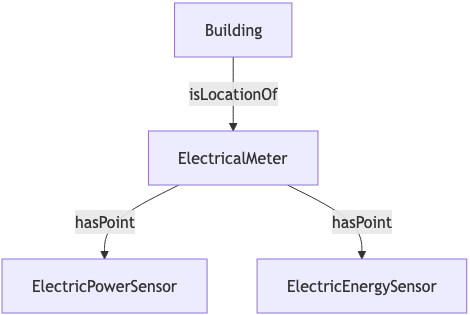
| Connector Concept | Mapped Type | Relationships |
|---|---|---|
| Historian Tag (.KWatts suffix) | Electrical_Meter | hasLocation Building, hasPoint Electric_Power_Sensor |
| Historian Tag (.Energy suffix) | Electrical_Meter | hasLocation Building, hasPoint Electric_Energy_Sensor |
| Historian Tag value (.KWatts) | Electric_Power_Sensor | isPointOf Electrical_Meter |
| Historian Tag value (.Energy) | Electric_Energy_Sensor | isPointOf Electrical_Meter |
| Type Details: |
- An Electrical Meter represents an electrical metering point in a building. They're created for each configured historian tag and named using the thing.name from the place mapping.
- Electric Power Sensors capture instantaneous power readings, representing an electrical metering point at a building. Tehse points are created for tags ending in .KWatts in the place mapping. These measure with unit KiloW and datatype DOUBLE.
- Electric Energy Sensors capture cumulative energy readings, created for tags ending in .Energy in the place mapping. They measure cumulative electrical energy consumption with unit MegaW-HR and datatype DOUBLE.
Sample Code
Use this query to view the latest time series for all Electrical Meters within a building.
{
  buildings(filter: {id: {eq: "BLDG5o26DguWKu5T9nRvSYn5Em"}}) {
    things(filter: {exactType: {eq: "Electrical_Meter"}}) {
      id
      name
      exactType
      points {
        id
        name
        exactType
        unit {
          id
          name
          description
        }
        series(latest: true) {
          value {
            float64Value
          }
          timestamp
          ingestionTime
        }
      }
    }
}