Butlr

Butlr provides occupancy sensing devices that can be used to track space utilization. The Butlr connector allows you to connect your Butlr devices to the Mapped graph, giving you access to occupancy and traffic count data.
Use Cases
- Monitor occupancy and traffic patterns across floors, rooms, and sub-room zones
- Reuse existing Mapped spaces while layering Butlr sensor coverage on top
- Analyze entry and exit counts for traffic-enabled rooms and zones
Configuration
Auth Requirements
Contact [email protected] in order to retrieve the ID and Secret.
| Field | Required | Description | Where to Find |
|---|---|---|---|
| Client ID | Yes | OAuth client identifier for the Butlr API | Butlr customer or developer portal |
| Client Secret | Yes | OAuth client secret for the Butlr API | Generated with the client ID |
Place Mappings
The mapping step loads Butlr buildings, floors, and rooms. Each row represents one room mapping and can optionally include sub-building information and space codes for matching existing spaces.
| Field | Required | Description |
|---|---|---|
| Building Name | Yes | Building name from Butlr |
| Building Site ID | Yes | Building/site identifier from Butlr |
| Building Address | Yes | Building address carried into the mapped building |
| Sub-building Name | No | Optional subdivision for wings or towers |
| Sub-building Code | No | Optional short code |
| Floor Ref ID | Yes | Butlr floor ID |
| Floor Name | Yes | Floor display name |
| Floor Level | Yes | Numeric floor level |
| Space Ref ID | Yes | Combined floor/room reference used by the connector |
| Space Name | Yes | Room display name |
| Space Code | No | External code used when matching existing spaces |
| Space Context | No | Read-only Butlr room metadata such as customID |
Advanced Options
| Option | Default | Description |
|---|---|---|
| Traffic Sensor Drift Correction | FALSE | Enables a dedicated traffic correction routine that runs hourly and only processes data during the 09:00 UTC correction window |
| Add Occupancy Zones | Mode-dependent | In custom mode, controls whether Butlr zones become child occupancy zones in the graph |
| Poll Settle Delay Minutes | 0 | Delays the effective query window by up to 10 minutes so Butlr data can settle before it is fetched |
| Simple Traffic Polling | TRUE | Replaces normal entry/exit polling with a day-to-date total routine for traffic counts |
Mapped Concepts
API to Mapped Entities
| Butlr concept | Mapped entity | exactType | Relationships |
|---|---|---|---|
| Mapped building/floor hierarchy | Building / Floor | Building / Floor | Place mapping establishes the parent hierarchy |
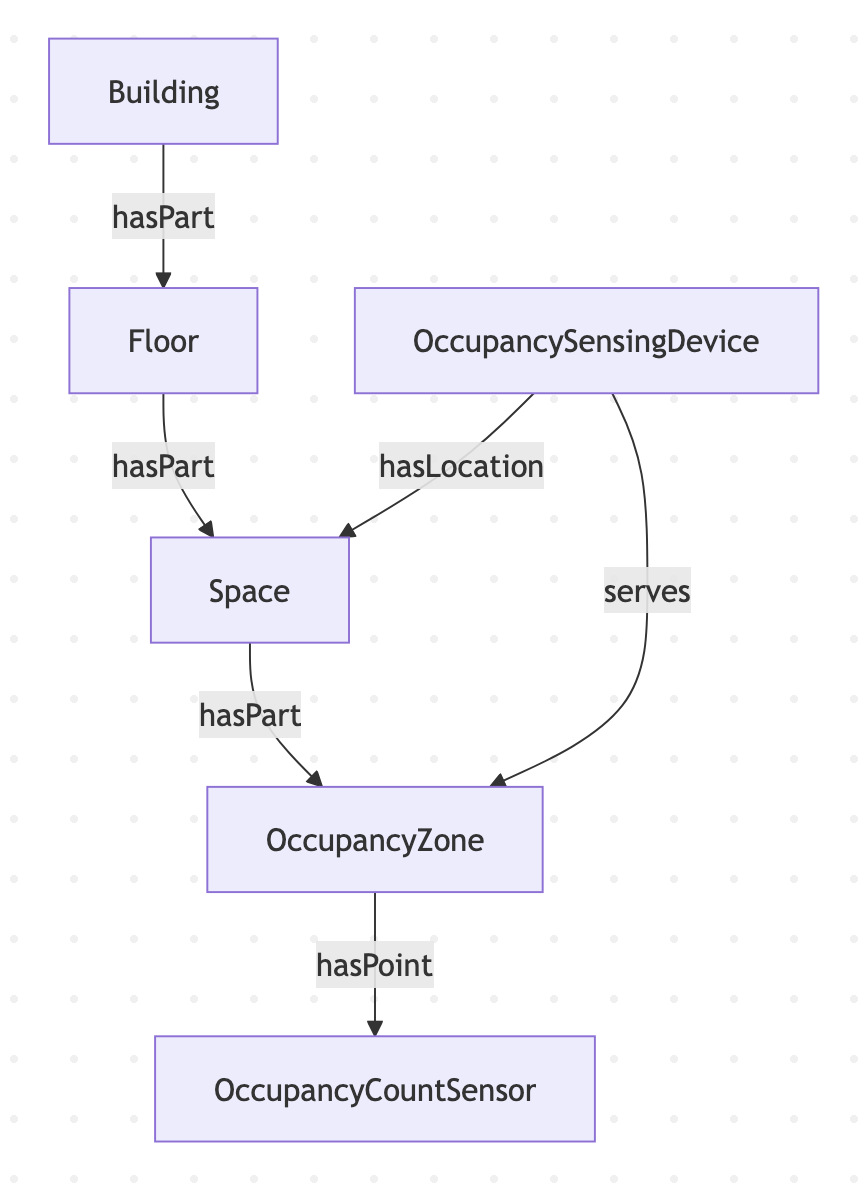
| Butlr room (materialized mode) | Space | Space | hasPart from floor |
| Butlr zone | Zone | OccupancyZone | hasPart from the mapped room/space |
| Virtual room zone | Zone | OccupancyZone | hasPart from the mapped existing space |
| Butlr sensor | Thing | OccupancySensingDevice | hasLocation to the mapped space and serves any created occupancy zone |
API to Mapped Points
| Butlr data | Point location | exactType | Datatype | Unit | Description |
|---|---|---|---|---|---|
| Floor occupancy report | Floor | OccupancyCountSensor | DOUBLE | NUM | Floor-level occupancy total |
| Room occupancy report | Space in default/custom mode, virtual zone in willow mode | OccupancyCountSensor | DOUBLE | NUM | Occupancy value for the mapped room |
| Room traffic report | Space | OccupancyCountSensor | DOUBLE | NUM | Traffic count for rooms with traffic-capable sensors |
| Room entry count | Space in default/custom mode, virtual zone in willow mode | OccupancyCountSensor | DOUBLE | NUM | Entry count derived from traffic data |
| Room exit count | Space in default/custom mode, virtual zone in willow mode | OccupancyCountSensor | DOUBLE | NUM | Exit count derived from traffic data |
| Zone occupancy report | Butlr occupancy zone | OccupancyCountSensor | DOUBLE | NUM | Occupancy for each provisioned Butlr zone |
| Zone entry/exit count | Butlr occupancy zone | OccupancyCountSensor | DOUBLE | NUM | Entry and exit counts for traffic-enabled zones |
The main poll runs every minute. When drift correction is enabled, a second hourly poll checks whether it is in the 09:00 UTC correction window before requesting traffic correction data.
Note: Presence sensors have been deprecated.
Sample Code
Query Occupancy Zones
{
  zones(filter: { connectedDataSourceId: { eq: "your-connector-Id" } }) {
	    id
	    name
	    exactType
	    mappingKey
	    isPartOf {
	      id
	      name
	      exactType
	    }
	    hasPoint {
	      id
	      name
	      exactType
	      mappingKey
	    }
	    isServedBy {
	      ...on Thing {
	        id
	        name
	        exactType
	      }
	    }
	  }
}
Query Occupancy Devices
Note: Since the deprecation of Presence Points in the Butlr API, Occupancy Devices no longer have trending points.
{
  things(filter:{connectedDataSourceId:{eq:"your-connector-Id"}}) {
	    id
	    name
	    exactType
	    mappingKey
	    serves {
	      ...on Zone {
	        id
	        name
	        exactType
	        mappingKey
	        isPartOf {
	          id
	          name
	          exactType
	        }
	        hasPoint {
	          id
	          name
	          exactType
	          mappingKey
	        }
	      }
	    }
	  }
}
Graph Diagram