FAMIS 360 Source

The FAMIS 360 Source connector syncs Work Orders from FAMIS 360 Spaces into Mapped graph and optionally syncs asset records.
Use Cases
- CMMS visibility in Mapped: Bring FAMIS 360 Work Orders, spaces, and assets into the graph so teams can query maintenance activity alongside other building data.
- Asset and location context: Link equipment records to buildings, floors, and spaces so downstream apps can understand where assets are located.
- Maintenance analytics: Report on Work Order status, priority, request type, assignee, and affected asset or space across your portfolio.
Configuration
Auth Requirements
The connector uses FAMIS 360 username / password authentication.
| Field | Required | Description | Where to Find |
|---|---|---|---|
| Base URL | Yes | Your FAMIS 360 instance URL | Your FAMIS 360 administrator (for example https://your-instance.famis360.com) |
| Username | Yes | Username used to access the FAMIS 360 API | Your FAMIS 360 administrator |
| Password | Yes | Password used to access the FAMIS 360 API | Your FAMIS 360 administrator |
Place Mappings
The place mapping table is populated from FAMIS 360 structured locations. Each row represents a space that will be available for Work Order ingestion, with its parent building and optional floor context.
| Mapping Field | Required | Notes |
|---|---|---|
| Building name | Yes | Parent building for the mapped location |
| Building address | Yes | Used when provisioning building records |
| Floor name | No | Include when FAMIS 360 provides floor information |
| Floor level | No | Optional numeric floor level |
| Space name | Yes | Required for each mapped location |
| Space code | Optional / read-only | Imported from FAMIS 360 when available |
| Space ID | Yes | Unique FAMIS 360 identifier for the space |
Notes
- Work Orders are only ingested when they are linked to a mapped Space.
- Buildings, floors, and spaces are provisioned from this mapping when the connector is saved.
Asset Mappings
Asset synchronization is optional. When enabled, you can map FAMIS 360 asset classes to Mapped exactType values.
| Option | Description |
|---|---|
| Asset type mapping | Maps each FAMIS 360 asset class to a Mapped exact type |
| Asset sync building selection | Limits asset synchronization to the buildings you choose |
Unmapped asset classes default to Thing.
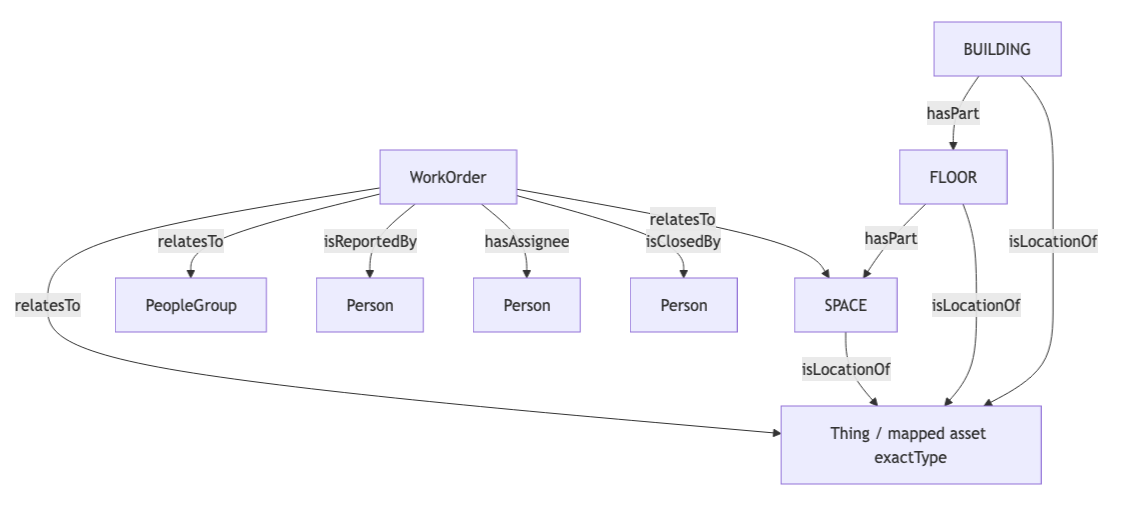
Mapped Concepts
API to Mapped Entities
| FAMIS360 data | Mapped entity | Exact type | Notes |
|---|---|---|---|
| Property from place mapping | Building | BUILDING | Provisioned from the selected place mappings |
| Floor from place mapping | Floor | FLOOR | Optional when floor data exists in FAMIS 360 |
| Space from place mapping | Space | SPACE | Required for Work Order ingestion |
| Asset record | Thing | Configurable per asset class | Linked to building, floor, and/or space when those identities are available |
| Work Order record | WorkOrder | WorkOrder | Includes status, priority, type, request type, request sub type, dates, and external identity |
| Requestor / assignee / closer | Person | Person | Created from Work Order user data and email when available |
| Crew | PeopleGroup | PeopleGroup | Related to the Work Order as the referenced crew/team |
Polling & Sync Behavior
| Function | Frequency | Description |
|---|---|---|
| Provision | On save / reprovision | Creates the building, floor, and space hierarchy from your place mappings |
| Work Order poll | Every 2 minutes | Syncs Work Orders from FAMIS 360 for mapped spaces. On the first run, it looks back 24 hours. |
| Historical backfill | On demand | Syncs Work Orders by date range or specific Work Order IDs. The IDs used must be the FAMIS 360 Work Order IDs. |
| Asset sync | On demand | Syncs assets for the buildings you select in the Asset Mappings section |
Sample Code
Query Work Orders
The below query shows the related Space and identifies for FAMIS 360 Work Orders. Read more about Work Orders.
{
workOrders(filter:{connectedDataSourceId:{eq:"your-connector-Id"}}){
  id
  name
  jobPriority
  jobStatus
  jobType
  summary
  dateCreated
  mappingKey
  identities {
    ... on ExternalIdentity {
      __typename
      value
    }
  }
  relatesTo {
    ...on GenericPlace {
      id
      name
      exactType
      mappingKey
      identities {
        ...on ExternalIdentity {
          __typename
          value
        }
      }
    }
  }
}
}
Graph Diagrams