R-Zero

The R-Zero connector integrates with the R-Zero (CoWorkr) occupancy sensing platform to bring real-time desk and space occupancy data into the Mapped Graph, receiving live occupancy status and count updates from workspace sensors.
Use Cases
Potential use cases include:
- Real-time occupancy monitoring: Track whether spaces and desks are occupied or vacant in real time, enabling live dashboards and space utilization analytics.
- Occupancy counting and space planning: Collect occupancy count data to understand how many people are using a space, supporting informed decisions about space allocation and office design.
- Building automation integration: Combine R-Zero occupancy signals with other building systems in the Mapped graph to drive automated HVAC, lighting, and energy optimization workflows.
Configuration
Auth Requirements
This connector requires the following credentials:
| Field | Required | Description |
|---|---|---|
| Username | Yes | Your R-Zero platform username. Obtain from your R-Zero account administrator. |
| Password | Yes | Your R-Zero platform password. |
| Note: The connector logs out of the R-Zero session after validating credentials and after fetching place mappings, since R-Zero limits the number of concurrent login sessions. |
Place Mapping
The connector discovers available workplaces, floor plans, and work points (sensors) from R-Zero and allows you to map them to Mapped graph entities. The mapping table auto-populates from R-Zero's API.
| Field | Required | Description |
|---|---|---|
| building.siteId | Yes | The Mapped site ID for the building. |
| building.refId | Yes | The R-Zero WorkPlace ID (auto-populated). |
| building.name | Yes | The name of the building/workplace from R-Zero. |
| building.address | No | The address of the building. |
| floor.refId | Yes | The R-Zero FloorPlan ID (auto-populated). |
| floor.name | Yes | The name of the floor plan from R-Zero. |
| floor.level | No | The floor level number. |
| space.name | No | The space name (used for point naming). |
| space.code | No | The space code identifier. |
| thing.refId | Yes | The R-Zero WorkPoint ID — unique identifier for each sensor. |
| thing.name | Yes | The name of the work point/sensor from R-Zero. |
| thing.context | No | Additional context including spaceId and spaceType from R-Zero tags. Editable in the mapping table. |
| Note: The thing.context field is auto-populated from R-Zero work point tags (room name and space type). The spaceId within the context is used to group multiple sensors into the same space entity. |
Advanced Options
| Option | Type | Default | Description |
|---|---|---|---|
| tsFlushIntervalSec | Number | 5 | How frequently (in seconds) queued timeseries data is flushed and merged into the Mapped graph. Lower values provide more real-time data but increase load. |
| tsDownsamplingPeriodSec | Number | 60 | The downsampling window (in seconds). Within each window, repeated observations for the same point are deduplicated to reduce data volume. |
| materializePointsForOccupancyZone | Boolean | false | When enabled, timeseries points (Occupancy Status and Occupancy Count) are attached to the Occupancy Zone entity. When disabled (default), points are attached directly to the Space entity. |
Mapped Concepts
Mapped Entities
| R-Zero Concept | Mapped Entity | exactType | Description |
|---|---|---|---|
| WorkPoint | Thing | OccupancySensingDevice | An individual occupancy sensor (desk sensor, room sensor, etc.) |
| Room / Space | Space | (varies by mapping) | The physical space where sensors are located, derived from work point grouping |
| — | OccupancyZone | OccupancyZone | A logical occupancy zone created for each sensing device |
| — | Point | OccupancyStatus | Timeseries point tracking occupied/vacant status (0 = Vacant, 1 = Occupied) |
| — | Point | OccupancyCountSensor | Timeseries point tracking the number of occupants |
Entity Relationships
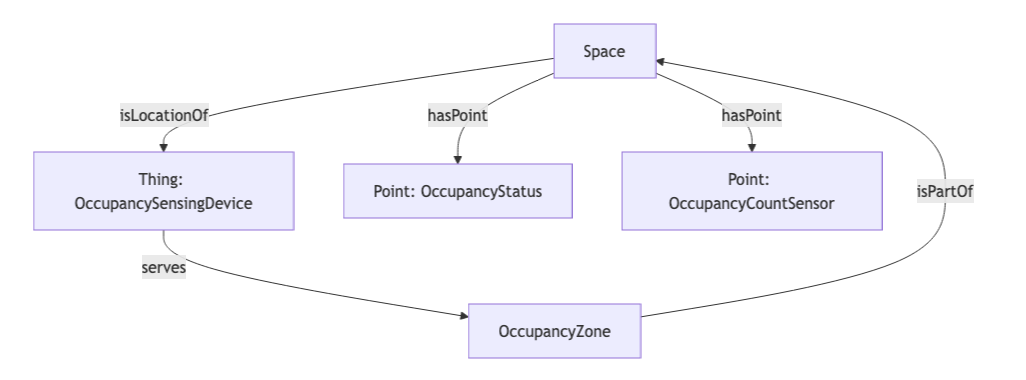
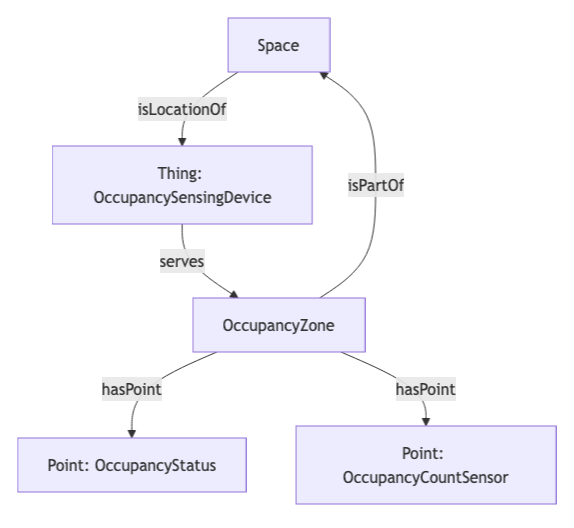
- Each Space contains one or more Things (sensing devices) via isLocationOf
- Each Thing (OccupancySensingDevice) serves an OccupancyZone
- Each OccupancyZone is part of a Space via isPartOf
- Points (OccupancyStatus and OccupancyCountSensor) are attached via hasPoint to either the Space (default mode) or the OccupancyZone (when materializePointsForOccupancyZone is enabled)
Mapped Points & Time Series
| Point Name | exactType | Datatype | Unit | Description |
|---|---|---|---|---|
| Occupancy Status - {space name} | OccupancyStatus | INT | NUM | Binary occupancy indicator. Uses a value map: 0 = "Vacant", 1 = "Occupied", 2 = "Null". |
| Occupancy Count - {space name} | OccupancyCountSensor | INT | NUM | The number of occupants detected in the space. |
Note: Timeseries data is streamed in real time via R-Zero's DDP WebSocket connection. Updates are received as occupancy changes occur and are batched before being merged into the graph (controlled by tsFlushIntervalSec).
Graph Diagrams
Default Mode (Points on Space)
Leave materializePointsForOccupancyZone set to false in the Advanced Config for the default mode where Points are tied to Space.
Occupancy Zone Mode (Points on OccupancyZone)
Set materializePointsForOccupancyZone to true in the Advanced Config for the Occupancy Zone Mode where Points are tied to the Occupancy Zone.
Sample Code
Get the latest occupancy status for all points
{
  points(filter: { connectedDataSourceId: { eq: "your-connector-Id" } }) {
    id
    name
    exactType
    valueMap
    mappingKey
    series(latest: true) {
      timestamp
      value {
        int64Value
      }
    }
  }
}
Get occupancy data over a time range
{
  points(
    filter: {
      connectedDataSourceId: { eq: "your-connector-Id" },
      and:
      {exactType: { eq: "Occupancy_Status" }}
    }
  ) {
    id
    name
    valueMap
    series(startTime: "2026-01-16", endTime: "2026-01-17") {
      timestamp
      value {
        int64Value
      }
    }
  }
}
Default mode relationships
Use this query to view the relationships between the Spaces, Zones and Points materialized when materializePointsForOccupancyZone is set to false in the connector Advanced Config.
{
  spaces(filter:{connectedDataSourceId:{eq:"your-connector-Id"}}) {
    id
    name
    exactType
    mappingKey
    isLocationOf {
      ...on Thing {
        id
        name
        exactType
        mappingKey
        serves {
          ...on Zone {
            id
            name
            exactType
            mappingKey
          }
        }
      }
    }
    isPartOf {
      id
      name
      exactType
      mappingKey
    }
    hasPoint {
      id
      name
      exactType
      mappingKey
    }
  }
}
Occupancy Zone relationships
Use this query to view the relationships between the Spaces, Zones and Points materialized when materializePointsForOccupancyZone is set to true in the connector Advanced Config.
{
  spaces(filter:{connectedDataSourceId:{eq:"your-connector-Id"}}) {
    id
    name
    exactType
    mappingKey
    isLocationOf {
      ...on Thing {
        id
        name
        exactType
        mappingKey
        serves {
          ...on Zone {
            id
            name
            exactType
            mappingKey
          }
        }
      }
    }
    hasPart {
      id
      name
      exactType
      mappingKey
      hasPoint {
        id
        name
        exactType
        mappingKey
      }
    }
  }
}