Tactic Room Reservations

The Tactic connector ingests workplace room-scheduling data from Tactic into the Mapped graph. It imports your Tactic offices as Buildings and your bookable meeting rooms as Spaces, then continuously polls Tactic for reservations and materializes them as Calendar Events attached to each room's booking calendar.
This gives the Mapped Graph a live, structured view of when and where rooms are booked. This data that can be forwarded downstream (for example, to the Willow Events Destination Connector) to drive energy optimization and space-utilization use cases.
Use Cases
- Occupancy-driven energy optimization: Feed room booking schedules to downstream systems so HVAC and lighting can be pre-conditioned only for rooms that are actually reserved.
- Space utilization analytics: Analyze reservation history per room and building to understand demand, identify under-used spaces, and inform real-estate decisions.
- Unified scheduling view: Combine Tactic room bookings with other building data in the Mapped graph for a single source of truth on space usage.
Configuration
Auth Requirements
The connector authenticates against the Tactic Public API v1 using a static API key (bearer token).
| Field | Required | Description |
|---|---|---|
| API Key | Yes | A Tactic Public API key. Provided by your Tactic administrator from the Tactic admin console. |
Entity Import
This connector uses the Mapped entities framework (not legacy place mappings). Import happens in two stages, each presented as its own step in the configuration UI:
1 . Offices — Load your Tactic offices and select which ones to import as Buildings. Because Tactic has no place hierarchy of its own, you choose how each office is linked into the org graph, by filling in one of two parent columns in the review grid:
- Site — imports the office as a top-level Building linked under the selected org Site (the default shape); or
- Parent Building — imports the office as a Sub-Building nested under an existing org Building (e.g. your authoritative CMMS/CAFM building). Use this when the office is really a part of a larger building whose floors and rooms already live in Mapped, so the office's meeting rooms resolve against that building's floors and space codes.
If both are filled in, the Parent Building wins. A postal address is composed from the Tactic office fields and can be adjusted; it is optional. When an office is imported as a Sub-Building you can also set an optional sub-building code — the shared code your authoritative place source knows this building-part by — which becomes the cross-connector anchor (scoped to the parent Building) that resolves the Tactic sub-building onto the same vertex.
2 . Meeting Rooms — Load meeting rooms as Spaces for the offices you selected in the previous step (the import is driven by those merged offices — there is no separate office filter; only rooms of type meeting room are imported). Each room has a single Location (Floor / Building / Sub-Building) column for its one parent place. It defaults to the room's office (a Building or Sub-Building, matching how that office was provisioned); change it to a Floor that already exists in the org graph to place the room on that floor and get a floor-scoped space code. There is no separate building column — you pick the one parent (Floor, Building or Sub-Building) the room belongs to.
3 . Desks — Load desks as Desk things for the offices you selected (only resources of type desk are imported). Each desk's Location (parent place) column defaults to the desk's floor when that floor already exists in your org graph — discovered from the desk's recent Tactic bookings, which are the only place Tactic exposes a desk's parent floor — otherwise to the desk's office building. You can change the parent to any Space, Floor, Building, Sub-Building or Zone in the grid. Each imported desk gets an occupancy point materialized on it, which the Desk Occupancy poll then writes to (see Timeseries Points).
Each selected entity is reviewed and merged into the graph. For rooms you can also set a Space Code — the shared room code your authoritative place source (e.g. a CMMS/CAFM connector) knows the room by. Tactic exposes no dedicated room-code field, so this column has no default and is left blank unless you enter a code; when set, it becomes the cross-connector anchor that lets a Tactic room resolve onto the same graph vertex another connector already published (see Graph Entities below).
Note: A Space Code is always written as an identity when you enter one, scoped to the room's chosen parent (typically a Floor).
Advanced Options
Poll Settings
| Option | Default | Description |
|---|---|---|
| Offices to Poll | All | Select which offices are included when polling for reservation events. If no offices are selected, all offices with merged rooms are polled. |
| Current Events Poll | Enabled | Polls Tactic for new and updated reservations every 30 minutes. |
| Future Events Poll | Enabled | Polls Tactic for upcoming reservations across a 30-day lookahead, once per day. |
Backfill
The Backfill section lets you import historical reservations for a specific date range on demand. Select a start and end date and start the backfill; large ranges are automatically chunked into 7-day windows to respect Tactic API limits. Only one backfill can run at a time. Progress is reported in the connector logs.
Mapped Concepts
API to Mapped Entities
| Tactic API Model | Mapped Entity | exactType | Notes |
|---|---|---|---|
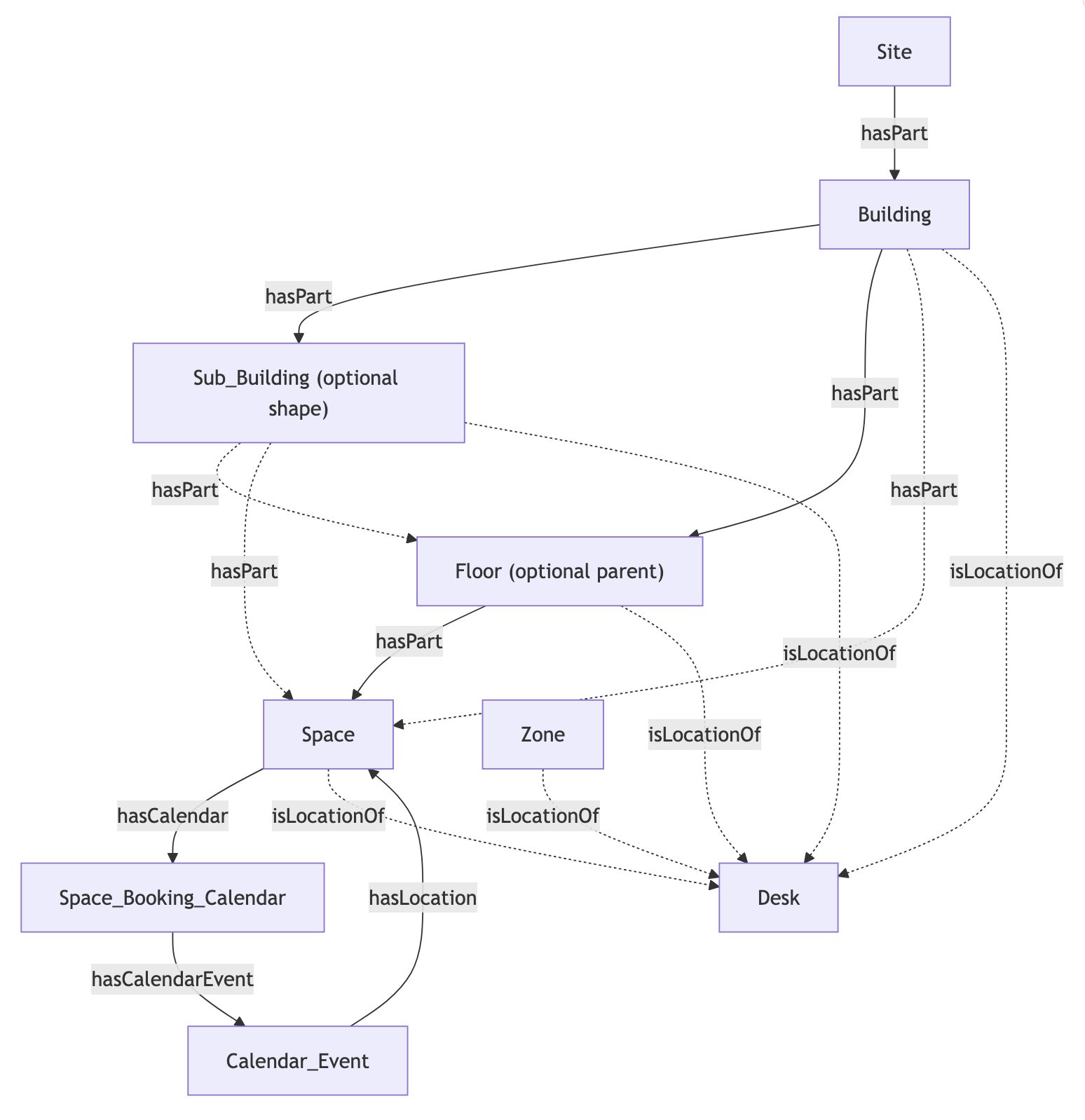
| Office | Building or Sub_Building | Building / Sub_Building | Named from the Tactic office name. Imported as a Building isPartOf a user-selected org Site, or (when a Parent Building is chosen) as a Sub_Building isPartOf that Building. Carries a postal address when one is provided. |
| Resource (meeting room) | Space | Space | isPartOf its single user-selected parent — a Floor (the norm) or its office Building/Sub_Building — chosen in one Location column. Only meeting rooms are imported. |
| Resource (desk) | Desk | Desk | A Thing that hasLocation its user-selected parent place (defaults to the desk's floor when it exists in the graph, else its office building). Only desks are imported. Carries a materialized occupancy point. |
| (per room, automatic) | SpaceBookingCalendar | Space_Booking_Calendar | One booking calendar is created per imported room, linked to the room via hasCalendar. |
| Reservation | CalendarEvent | Calendar_Event | Attached to the room's booking calendar via hasCalendarEvent; hasLocation points to the room. |
Only reservations in an accepted or cancelled state are processed; pending reservations are ignored. If a reservation is moved to a different room, the event's link to the previous room's calendar is removed on the next merge.
Relationships
Offices An office has exactly one place parent, chosen in the grid: a Building isPartOf the org Site selected during import (inverse: Site.hasPart / Site.buildings), or a Sub_Building isPartOf a selected org Building (inverse: Building.hasPart / Building.subBuildings).
A Sub_Building may additionally carry a SubBuildingCode identity, scoped to its parent Building, as a cross-connector anchor.
Meeting Rooms
A room Space has exactly one structural parent, chosen in a single Location column: it isPartOf a Floor when a floor was selected (inverse: Floor.hasPart / Floor.spaces), otherwise it isPartOf its office Building/Sub_Building directly (inverse: Building.hasPart / Building.spaces).
Each room Space carries up to two identities under identities:
- A SpaceCode, scoped to the room's chosen parent (a Floor in the common case, or the Building/Sub_Building when the room is mapped straight to its building), whenever a code was entered. This is the cross-connector anchor: another connector publishing the same code under the same parent resolves onto the same Space vertex rather than creating a parallel one. The authoritative place source scopes its room codes to the floor, so pick the floor to dedup against it.
- An external identity (ExternalIdentity), scoped to this connector, holding the Tactic resource id for continuity.
Calendar Events
Each Space hasCalendar a SpaceBookingCalendar (inverse: SpaceBookingCalendar.isCalendarOf).
A SpaceBookingCalendar hasCalendarEvent for each reservation.
Each CalendarEvent hasLocation set to the booked Space, carries startTime / endTime, and holds an external identity of the form urn:tactic:reservation🆔<reservation-id>.
Desks
Each desk Desk hasLocation exactly one parent place (a Floor, Building, Sub_Building, Space or Zone, chosen in the grid), hasPoint one Occupancy_Status point, and carries a connector-scoped ExternalIdentity holding the Tactic desk resource id.
Time Series Points
The connector materializes one Occupancy_Status point on each imported desk (Desk hasPoint Occupancy_Status). The point is an ENUM with 1 = Occupied / 0 = Unoccupied. The Desk Occupancy poll (every 30 minutes) writes a sample to each merged desk's point: 1 when an accepted Tactic reservation covers the poll instant, otherwise 0.
Tactic has no occupancy sensor, so occupancy is derived from reservation coverage. The poll writes time series only to points materialized at desk import — it creates no graph structure of its own.
Meeting-room reservations remain graph entities (booking calendars and calendar events), not timeseries.
Sample Code
List the buildings and rooms created by this connector
{
  connectors(filter: { id: { eq: "your-connector-Id" } }) {
	    id
	    name
	    buildings {
	      id
	      name
	      exactType
	      mappingKey
	      spaces {
	        id
	        name
	        exactType
	        mappingKey
	      }
	    }
	  }
}
Read a room's booking calendar and its events
{
  connectors(filter: { id: { eq: "your-connector_id" } }) {
	    spaces {
	      id
	      name
	      exactType
	      mappingKey
	      isPartOf {
	        id
	        name
	        exactType
	      }
	      hasCalendar {
	        id
	        name
	        exactType
	        mappingKey
	        hasCalendarEvent {
	          id
	          name
	          exactType
	          mappingKey
	          exactType
	          startTime
	          endTime
	        }
	      }
	    }
	  }
}
Query Desks and their Occupancy Sensors and Locations
{
  things(filter: {connectedDataSourceId: {eq: "your-connector-Id"}}) {
	    id
	    name
	    exactType
	    mappingKey
	    hasPoint {
	      id
	      name
	      exactType
	    }
	    hasLocation {
	      id
	      name
	      exactType
	    }
	  }
}
Graph Diagrams