WebTMA Destination

The WebTMA Destination connector sends Work Orders and Service Requests from the Mapped graph into WebTMA. It's designed for organizations that use Mapped as the operational hub and want selected maintenance records to be created or updated in WebTMA with the right building context, status mappings, and repair center assignments.
Use Cases
- Route Mapped work into WebTMA: Push Work Orders and Service Requests created in Mapped or another source connector into WebTMA for execution.
- Standardize cross-system dispatch: Normalize records in Mapped, then translate statuses, priorities, and work types into WebTMA-specific values.
- Backfill historical records: Send previously created Mapped Work Orders or Service Requests to WebTMA by date range or by specific graph IDs.
Configuration
Auth Requirements
Provide the WebTMA credentials used for write access.
| Field | Required | Description | Where to Find |
|---|---|---|---|
| Client Name | Yes | Your WebTMA client or tenant name | Provided by your WebTMA administrator |
| Username | Yes | WebTMA username with permission to create and update records | Provided by your WebTMA administrator |
| Password | Yes | Password for the WebTMA user | Provided by your WebTMA administrator |
You can also import these settings from an existing WebTMA Source connector in the same organization.
Place Mappings
This connector uses the Building Selection tab to scope which Mapped records are allowed to sync to WebTMA. Select one or more WebTMA Buildings for this connector's scope, and only Work Orders and Service Requests associated with those mapped Buildings will be eligible for sync.
If a Mapped Work Order or Service Request does not contain matching WebTMA location identities for a Building, Floor, or Space, the connector skips it for syncing.
Work Order Mappings
Complete these enum mappings to ensure Work Orders and Service Requests sync correctly.
| Mapping | Required to sync Work Orders | Description |
|---|---|---|
| Work Order Status | Yes | Maps Mapped jobStatus values to WebTMA status IDs |
| Work Order Priority | Yes | Maps Mapped jobPriority values to WebTMA priority IDs |
| Work Order Type | Yes | Maps Mapped jobType values to WebTMA Work Order type IDs |
| Work Order Task Type | Recommended | Maps Mapped sector values to WebTMA task IDs when tasks are created |
| Work Order Repair Center | Yes | Maps hasAssignedGroup.name to a WebTMA repair center |
Service Request Mappings
| Mapping | Required to sync Service Requests | Description |
|---|---|---|
| Service Request Status | Yes | Maps Mapped requestStatus values to WebTMA status IDs |
| Service Request Repair Center | Yes | Maps isResponsibilityOf.name to a WebTMA repair center |
| Service Request Type | Yes | Selects the WebTMA request type used when creating Service Requests |
For the enum-based mappings above, the UI supports:
- enabling or disabling a mapping set
- choosing a default value
- applying the default only when no explicit mapping is found
Advanced Options
Required step: Open Settings and explicitly enable Work Order Polling and/or Service Request Polling for the record types you want to send to WebTMA. If a toggle is off, that entity type will not sync and backfill for that type is effectively disabled.
| Option | Description |
|---|---|
| Enable Work Order Polling | Sends eligible Mapped Work Orders to WebTMA |
| Enable Service Request Polling | Sends eligible Mapped Service Requests to WebTMA |
| Create a "Requested Action" entry for assets associated with Service Requests | Adds related asset details into the WebTMA request body for Service Requests |
| Use lookback (hours) on connector restart for graph queries | Re-reads a configurable recent window after restart |
| Import from WebTMA Source connector | Reuses credentials and related settings from an existing source connector |
| Backfill | Sends historical Work Orders and/or Service Requests by date range or by specific Mapped graph IDs |
Mapped Concepts
API to Mapped Entities
| Sync direction | Mapped entity involved | What the connector writes back |
|---|---|---|
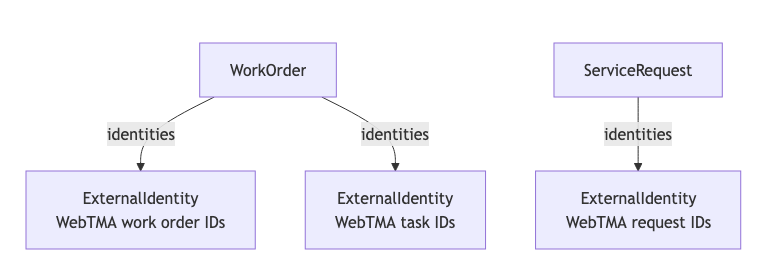
| Mapped → WebTMA Work Order | WorkOrder | WebTMA Work Order identities in identities |
| Mapped → WebTMA Service Request | ServiceRequest | WebTMA Service Request identities in identities |
Typical identities added after a successful sync include WebTMA record IDs and record numbers. These identities allow the connector to recognize records it already created and update them instead of creating duplicates.
Requirements for Syncing
- Polling must be enabled under Settings for the applicable entity - Work Orders or Service Requests (or both).
- The Work Order or Service Request must be related to a location which resolves to a Building selected in the config.
- For Work Orders, the following enums must be mapped under Work Order Mappings: Work Order Status, Work Order Priority, Work Order Type, Work Order Task Type, Work Order Repair Center.
- For Service Requests, the following enums must be mapped under Service Request Mappings: Status, Type, Repair Center
Sample Code
Query Work Orders
Read more about querying Work Orders in the Mapped Graph.
{
  workOrders(filter: { connectedDataSourceId:{ eq: "your-connector-Id"}}) {
	    id
	    name
	    exactType
	    mappingKey
	    dateCreated
	    dateUpdated
	    dateClosed
	    jobPriority
	    jobStatus
	    jobType
	    sector
	    description
	    summary
	    hasAssignedGroup {
	      name
	    }
	    isReportedBy {
	      name
	    }
	    hasAssignee {
	      name
	    }
	    isClosedBy {
	      name
	    }
	    isCreatedBy {
	      name
	    }
	    identities {
	      ... on ExternalIdentity {
	        __typename
	        value
	      }
	    }
	    relatesTo {
	      ... on Building {
	        id
	        name
	        exactType
	        identities {
	          ...on ExternalIdentity {
	            __typename
	            value
	          }
	        }
	      }
	      ... on Floor {
	        id
	        name
	        exactType
	        identities {
	          ...on ExternalIdentity {
	            __typename
	            value
	          }
	        }
	      }
	      ... on Space {
	        id
	        name
	        exactType
	        identities {
	          ...on ExternalIdentity {
	            __typename
	            value
	          }
	        }
	      }
	      ... on Thing {
	        id
	        name
	        exactType
	        identities {
	          ...on ExternalIdentity {
	            __typename
	            value
	          }
	        }
	      }
	    }
	  }
}