Willow Import

The Willow Import Source connector integrates Willow digital twin data into the Mapped graph. Willow is a digital twin platform that models buildings, floors, spaces, and equipment as a hierarchical twin graph with rich DTDL-based ontology types.
Willow data supplements the Mapped Graph with twin Ids as external identities as well as new entities for twins that don't yet exist in Mapped.
Use Cases
- Cross-system asset correlation: Link Willow digital twin IDs to Mapped entities so downstream applications can look up the same asset across both platforms.
- Building hierarchy import: Materialize Willow's spatial hierarchy (buildings, sub-buildings, floors, rooms, zones) and equipment inventory (AHUs, VAVs, chillers, etc.) into the Mapped graph for unified facility analytics.
- Identity correction: Replace stale space codes, floor levels, or building addresses in Mapped with current values from the Willow twin graph.
- System-level grouping: Import logical equipment groupings (HVAC systems, electrical systems) as Collections, enabling queries like viewing all the equipment in a chilled water system.
- Telemetry point discovery: Import capability/sensor metadata as Points attached to their parent equipment, preparing the Graph for time series data ingestion from complementary connectors.
Configuration
Auth Requirements
The connector authenticates with the Willow API using OAuth 2.0 client credentials.
| Field | Required | Description |
|---|---|---|
| Base URL | Yes | The Willow API endpoint (e.g., https://your-instance.app.willowinc.com/api/v3) |
| Client ID | Yes | OAuth client ID from your Willow application registration |
| Client Secret | Yes | OAuth client secret from your Willow application registration |
Contact your Willow administrator to obtain API credentials.
Select Buildings
Choose one or more Willow buildings to include in place mappings and twin imports. The connector presents all available buildings in a dual-pane transfer list.
Move buildings from the Available side to the Selected side to include them.
Selected building IDs are stored in the connector configuration and determine the scope for all Actions (Sync Identities, Import Twins, Import Collections, and Import Points).
Place Mappings
After selecting buildings, the connector populates a place mapping table by walking Willow's building hierarchy (Building → Sub-Buildings → Floors). Each row represents a floor and includes:
| Column | Description |
|---|---|
| Building Name | Willow building name |
| Building RefId | Willow building twin ID |
| Sub-Building Name | Parent sub-building name (if applicable) |
| Sub-Building Code | Parent sub-building twin ID |
| Floor Name | Willow floor/level name |
| Floor Level | Numeric floor level |
The mapping table supports:
- Import / Export CSV for bulk editing
- Mapping Rules Editor for advanced rule-based matching
- Normalize Addresses toggle for address standardization. Use with caution as Buildings merge on the PostalAddressIdentity value. Mismatched addresses between connectors will result in duplicate Buildings.
Actions
Please review Recommended Action Sequence after the actions described below.
Sync Identities
Synchronizes Willow place identities onto existing Mapped entities based on the configured place mappings. For each mapped building and floor, the connector attaches a Willow external identity URN (urn:willowinc:twin🆔<twinId>) to the corresponding Mapped entity.
This action respects the identity correction toggles in Advanced Options (see below).
Import Twins
Imports the full building hierarchy from Willow as new Mapped entities. The connector traverses the Willow twin graph starting from each selected building and creates entities for:
- Buildings, sub-buildings, and floors
- Rooms and spaces
- Zones (HVAC, lighting, occupancy)
- Equipment and assets (AHUs, VAVs, chillers, fans, valves, electrical panels, etc.)
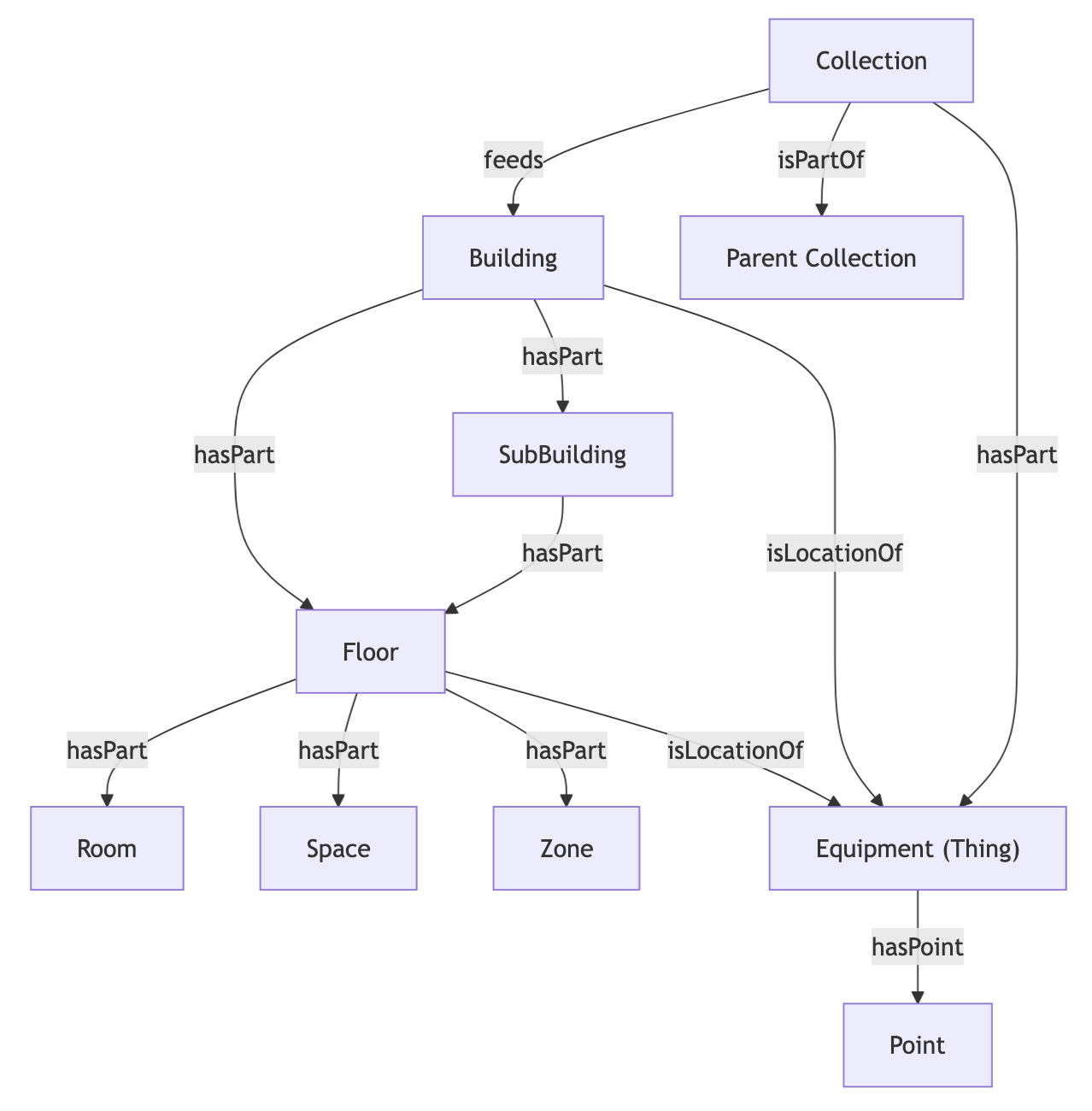
Each imported entity receives a Willow external identity and is placed in the correct hierarchical relationship (e.g., floors are part of sub-buildings, equipment is located in floors).
The scope of imported twin types is controlled by the Models Allowed for Import setting in Advanced Options.
Import Collections
Imports Willow Collection twins, which are logical groupings of assets such as HVAC systems, electrical systems, and equipment groups. Collections are not part of the spatial hierarchy, but rather they represent functional systems that span multiple spaces or floors.
This action must be run after Import Twins so that asset entities already exist in the Graph. The connector resolves relationships using previously-imported entities' external identities.
For each Collection, the connector creates:
- A Collection entity with the resolved ontology subtype (e.g., HVAC_System, Electrical_System)
- hasPart relationships to member assets (equipment included in the collection)
Import Points
Imports Willow Capability twins, including sensors, actuators, parameters, and state values, as Mapped Point entities. Each Point represents a telemetry stream or control value attached to a piece of equipment.
This action must be run after Import Twins so that parent asset entities already exist in the graph.
For each Capability twin, the connector creates:
- A Point entity with the resolved ontology subtype (e.g., Temperature_Sensor, Flow_Setpoint, On_Off_Command)
- An isPointOf relationship linking the point to its parent equipment
- A trendID external identity (when available) for correlation with Willow telemetry streams
- A datatype assignment based on the Willow capability type analog / sum → DOUBLE binary → BOOL multiState → ENUM
| Willow Capability Type | Mapped Datatype |
|---|---|
| analog / sum | DOUBLE |
| binary | BOOL |
| multiState | ENUM |
Note: Unit mapping is not implemented. Willow unit strings are not translated to Mapped unit values.
Recommended Action Sequence
For a complete graph build, run actions in this order:
1: Sync Identities — Attach Willow identities to existing Mapped places
2: Import Twins — Create the spatial hierarchy and equipment entities
3: Import Collections — Create system/group entities with membership edges to equipment
4: Import Points — Create point entities linked to their parent equipment
Each subsequent action depends on entities created by the previous step. The UI enforces this sequencing by disabling later actions until prerequisites have completed.
Advanced Options
Mapping Key Format
| Option | Description |
|---|---|
| Twin ID (default) | External identities use the Willow twin ID: urn:willowinc:twin🆔<twinId> |
| Site ID (legacy) | External identities use the Willow site ID: urn:willowinc:site🆔<siteId>. Use this only for backward compatibility with older Willow connector deployments. |
Models Allowed for Import
Controls which Willow twin types are included during the Import Twins action. Multiple selections are supported. Leave empty to use the default set.
| Option | DTMI |
|---|---|
| Buildings | dtmi:com:willowinc:Building;1 |
| SubBuildings | dtmi:com:willowinc:SubBuilding;1 and structural subtypes (Podium, Tower, Wing) |
| Levels / Floors | dtmi:com:willowinc:Level;1 and subtypes (MezzanineLevel) |
| Rooms | dtmi:com:willowinc:Room;1 |
| Spaces | dtmi:com:willowinc:Space;1 and subtypes (OutdoorArea, ParkingSpot, etc.) |
| Zones | dtmi:com:willowinc:Zone;1 and subtypes (HVACZone, LightingZone, OccupancyZone) |
| Assets / Equipment | All equipment types with valid ontology mappings (AHU, Chiller, VAV, Fan, Pump, Valve, Meter, etc. — 3,600+ types) |
| Companies | dtmi:com:willowinc:Company;1 (manufacturer entities) |
The default includes Buildings, SubBuildings, Levels, Spaces, Rooms, Zones, and Assets.
Identity Correction Toggles
These toggles control how the Sync Identities action handles stale identities on existing Mapped entities. When enabled, old identities of the specified type are removed so that the current Willow-sourced value replaces them.
| Toggle | Description |
|---|---|
| Correct Space Codes | Removes stale space code identities during Sync Identities |
| Correct Floor Levels | Removes stale floor level identities during Sync Identities |
| Correct Building Addresses | Removes stale postal address identities during Sync Identities |
| Correct Sub-Building Codes | Removes stale sub-building code identities during Sync Identities |
| Correct External Identities | Removes stale external identities during Sync Identities (all entity types) |
Each toggle takes effect immediately when changed (no Save required).
Mapped Concepts
Entities Created
The connector creates the following entity types in the Mapped graph, depending on which actions are used and what twin types are allowed.
Place Entities (Sync Identities & Import Twins)
| Willow Twin Type | Mapped Entity Type | Description |
|---|---|---|
| Building | Building | Top-level building |
| SubBuilding, BuildingPodium, BuildingTower, BuildingWing | SubBuilding | Structural divisions within a building |
| Level, MezzanineLevel | Floor | Floor/level within a building or sub-building |
| Space, OutdoorArea, ParkingSpot | Space | General space or specialized area |
| Room | Room | Named room within a floor |
| Zone, HVACZone, LightingZone, OccupancyZone | Zone | Logical zone spanning spaces |
Equipment Entities (Import Twins only)
| Willow Twin Type | Mapped Entity Type | Examples |
|---|---|---|
| AirHandlingUnit | Air_Handling_Unit | Central air handlers |
| VAV, FanPoweredVAV | Variable_Air_Volume_Box, Fan_Powered_VAV | Terminal units |
| Chiller, WaterCooledChiller | Chiller, Water_Cooled_Chiller | Cooling plant |
| Boiler | Boiler | Heating plant |
| Pump, ChilledWaterPump | Pump, Chilled_Water_Pump | Fluid movers |
| Fan, SupplyFan, ExhaustFan | Fan, Supply_Fan, Exhaust_Fan | Air movers |
| Damper | Damper | Airflow control |
| Valve | Valve | Fluid control |
| ElectricalMeter | Electrical_Meter | Power metering |
| BreakerPanel, Switchgear, Transformer | Breaker_Panel, Switchgear, Transformer | Electrical distribution |
| (3,600+ additional types) | Various | Full ontology-mapped equipment inventory |
The connector uses a 3,600+ entry ontology mapping to translate Willow DTDL model types to Mapped Brick Schema entity types. Equipment types that cannot be mapped are created as generic Thing entities.
Collection Entities (Import Collections)
| Willow Twin Type | Mapped Entity Type | Description |
|---|---|---|
| Collection (base) | Collection | Generic logical grouping |
| System subtypes (HVACSystem, ElectricalSystem, etc.) | HVAC_System, Electrical_System, etc. | Functional system groupings |
| EquipmentGroup | Collection | Arbitrary equipment grouping |
Collections represent functional systems, groups of equipment that work together like a chilled water loop or an AHU system with its VAVs. They are not placed in the spatial hierarchy but reference the assets within them via hasPart relationships.
Point Entities (Import Points)
| Willow Twin Type | Mapped Entity Type | Description |
|---|---|---|
| Sensor subtypes (TemperatureSensor, FlowSensor, etc.) | Temperature_Sensor, Flow_Sensor, etc. | Measurement points |
| Setpoint subtypes (TemperatureSetpoint, PressureSetpoint, etc.) | Temperature_Setpoint, Pressure_Setpoint, etc. | Control setpoints |
| Command subtypes (OnOffCommand, SpeedCommand, etc.) | On_Off_Command, Speed_Command, etc. | Actuator commands |
| State subtypes (OccupancyStatus, RunStatus, etc.) | Occupancy_Status, Run_Status, etc. | Equipment state values |
| Parameter subtypes | Various | Configuration parameters |
Points are mapped to their specific Brick Schema subtype using the same ontology mapping file. Points that cannot be mapped are created as generic Point entities. Each point includes a datatype (DOUBLE, BOOL, or ENUM) derived from the Willow capability type.
External Identities
Every entity created by the connector receives an ExternalIdentity with:
- Value: urn:willowinc:twin🆔<willowTwinId> (or urn:willowinc:site🆔<siteId> in legacy mode)
- Scope: ORG
- Scope ID: The Mapped organization ID
Additionally, all entities receive a CONNECTOR-scoped identity using the raw Willow twin ID, which enables cross-entity relationship resolution during import.
Point entities may also receive a trendID identity:
- Value: urn:willowinc:twin:trendID:<trendId>
- Scope: CONNECTOR
- Scope ID: The connector instance ID
This trendID identity enables downstream connectors or integrations to correlate Mapped Point entities with Willow telemetry streams.
Sample Code
List buildings with Willow identities
Note that this will only show Buildings that were created via the Willow Import connector in your organization. You can find the connectorId in the Mapped Console grid view connectors tab.
{
  buildings(filter: { connectedDataSourceId: { eq: "your-connector-Id" } }) {
	    id
	    name
	    exactType
	    identities {
	      __typename
	      ... on ExternalIdentity {
	        value
	        scope
	        scopeId
	      }
	    }
	    subBuildings {
	      id
	      name
	      exactType
	    }
	    floors {
	      id
	      name
	    }
	  }
}
List all Things (equipment) from this connector
{
  things(filter: { connectedDataSourceId: { eq: "CONSZo4tuxPFhqSpucRVP8V6V" } }) {
	    id
	    name
	    exactType
	    hasLocation {
	      ... on Floor { id name exactType }
	      ... on Building { id name exactType }
	    }
	    identities {
	      __typename
	      ... on ExternalIdentity { value scope scopeId }
	    }
	  }
}
Graph Diagrams