Willow Ticket Source

The Willow Ticket Source connector integrates with the Willow platform to ingest ticket and service request data into the Mapped graph in real time. It receives webhook events from Willow whenever tickets are created or updated, and transforms them into Service Requests and Work Orders with associated people, places, and asset relationships.
Use Cases
Potential use cases include:
- Unified CMMS visibility: View all Willow service requests and work orders alongside data from other building systems in a single graph
- Cross-system ticket routing: Enable downstream destinations (e.g. Tririga, ServiceNow) to receive enriched ticket data with standardized entity types and relationships
- Facilities analytics: Query service request and work order data by building, priority, status, and assignee to identify trends and optimize maintenance operations
Configuration
Authentication
| Field | Required | Description | Where to Find |
|---|---|---|---|
| Base URL | Yes | Your Willow instance API base URL | Provided by your Willow administrator (e.g. https://your-instance.app.willowinc.com/api/v3) |
| Client ID | Yes | Azure AD application (client) ID | Azure Portal → App Registrations → Your Willow app → Application (client) ID |
| Client Secret | Yes | Azure AD application client secret | Azure Portal → App Registrations → Your Willow app → Certificates & Secrets |
| When you save the Auth configuration, the connector validates your credentials by requesting a token from the Willow API. If authentication fails, you will see an error message. |
Site Selection (Mapping)
After authentication, you must select which buildings (sites) the connector should receive tickets for.
| Field | Required | Description |
|---|---|---|
| Selected Sites | Yes | One or more Willow buildings from which to sync tickets |
| The dropdown is populated with all buildings from your Willow instance. Only tickets associated with a selected building will be processed; tickets from other buildings are silently dropped. |
Webhook
After saving the site selection, the connector automatically creates a webhook receiver in Mapped. The Webhook section displays the receiver details needed to configure your Willow instance to send ticket events to Mapped. Share these details with your Willow administrator to complete the integration.
Advanced Options
| Option | Default | Description |
|---|---|---|
| Enable Willow Sourced Tickets Only | true | When enabled, only tickets originating from the Willow platform are published to the graph. Disable to include tickets from external integrations. |
| Combine Category and Job Type | false | When enabled, the service request's category and jobType fields are concatenated with a hyphen (e.g. "Maintenance-HVAC") into a single compound value. This is useful for downstream systems that need a richer job type classification. |
Combine Category and Job Type -- Behavior Details
This option only affects Service Requests. Work Orders are not affected.
| jobType | category | Result |
|---|---|---|
| Maintenance | HVAC | Maintenance-HVAC |
| Maintenance | (empty) | Maintenance |
| (empty) | HVAC | HVAC |
| (empty) | (empty) | (null) |
Mapped Concepts
Overview
The connector creates two primary entity types depending on the ticket's status:
- Service Request: Created for tickets with status Unscheduled or Canceled
- Work Order: Created for tickets with any other status (eg In Progress, Completed, On Hold)
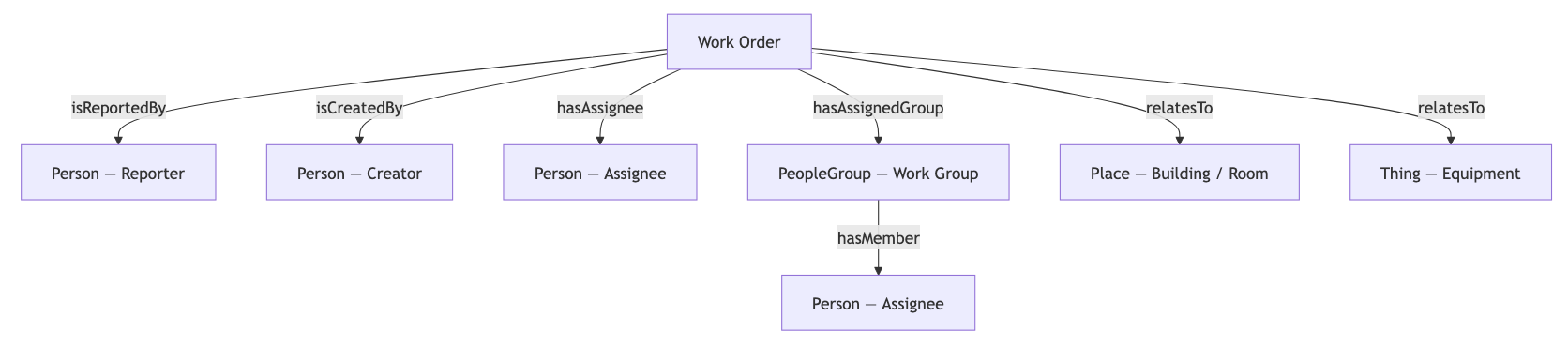
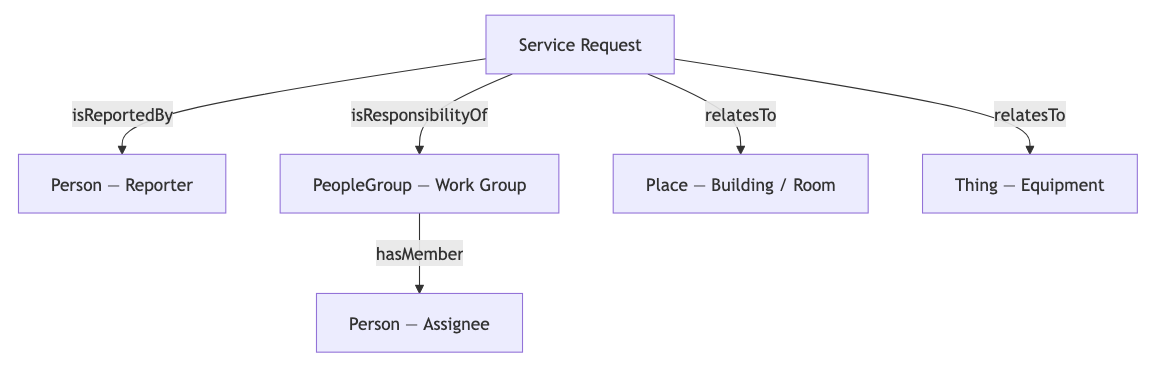
Both entity types establish relationships with People (reporters, creators, assignees), People Groups (work groups), and Places/Things (buildings, rooms, equipment) referenced in the ticket.
Mapped Entities
| Willow Data | Mapped Entity | Condition | Key Fields |
|---|---|---|---|
| Ticket (Unscheduled/Canceled) | ServiceRequest | ticketStatus is Unscheduled or Canceled | summary, description, jobPriority, sector, requestStatus, referenceUrl |
| Ticket (all other statuses) | WorkOrder | ticketStatus is anything else | summary, description, jobStatus, jobSubStatus, jobPriority, jobType, sector, dueDate, dateClosed, dateCompleted, referenceUrl, problemDescription, resolutionDescription |
| Ticket Reporter | Person | Reporter has email address | name, email-based identity |
| Ticket Creator | Person | Creator has email address (Work Orders only) | name, email-based identity |
| Ticket User Assignee | Person | User assignee has email address | name, email-based identity |
| Ticket Work Group | PeopleGroup | Work group is assigned | name, external identity, optional member person |
| Ticket Locations | Place (via identity reference) | Location twin IDs in ticket | Resolved via Willow twin API and ontology mapping |
| Ticket Asset Twin | Thing (via identity reference) | Asset twin ID in ticket | Resolved via Willow twin API and ontology mapping |
Service Request Fields
| GraphQL Field | Source | Description |
|---|---|---|
| summary | Ticket summary | Brief description of the request |
| description | Ticket description | Detailed information |
| jobPriority | Ticket priority level | Urgency (e.g. high, medium, low) |
| sector | Ticket category name | Category of the request (e.g. HVAC, Plumbing) |
| requestStatus | Ticket status name | Current status (e.g. Unscheduled, Canceled) |
| referenceUrl | Willow URL or Insight URL | Link back to the original ticket in Willow |
| identities | Ticket ID | External identity: urn:willowinc🎫id:{ticketId} |
Work Order Fields
| GraphQL Field | Source | Description |
|---|---|---|
| summary | Ticket summary | Brief description |
| description | Ticket description | Detailed information |
| jobStatus | Ticket status name | Current status (e.g. In Progress, Completed) |
| jobSubStatus | Ticket sub-status name | More specific status |
| jobPriority | Ticket priority level | Urgency level |
| jobType | Ticket job type name | Type of work (e.g. Maintenance, Repair) |
| sector | Ticket category name | Category |
| dueDate | Ticket due date | When the work is expected to be done |
| dateClosed | Ticket closed date | When the ticket was closed |
| dateCompleted | Ticket resolved date | When the work was completed |
| externalDateCreated | Ticket created date | When the ticket was originally created in Willow |
| externalDateUpdated | Ticket updated date | Last update time in Willow |
| referenceUrl | Willow URL or Insight URL | Link back to the original ticket |
| problemDescription | Ticket service needed | What service was requested |
| resolutionDescription | Ticket solution | How the issue was resolved |
| subject | Ticket cause | Root cause of the issue |
| identities | Ticket ID | External identity: urn:willowinc🎫id:{ticketId} |
Mapped Points & Time Series
This connector does not create time series points. It creates entity data only.
Graph Diagrams
Work Order Relationships
Service Request Relationships
Sample Code
List all Service Requests from this connector
{
  serviceRequests(filter: { connectedDataSourceId: { eq: "your-connector-Id" } }) {
    id
    summary
    description
    jobPriority
    sector
    requestStatus
    referenceUrl
    isReportedBy {
      name
      emails { address }
    }
    isResponsibilityOf {
      name
      hasMember { name }
    }
    relatesTo {
      ... on Building { id name }
      ... on Space { id name exactType }
      ... on Thing { id name exactType }
    }
    identities {
      ... on ExternalIdentity { value scope scopeId }
    }
  }
}
List all Work Orders from this connector
{
  workOrders(filter: { connectedDataSourceId: { eq: "your-connector-Id" } }) {
    id
    mappingKey
    summary
    description
    jobStatus
    jobPriority
    jobType
    sector
    referenceUrl
    problemDescription
    resolutionDescription
    isReportedBy {
      name
      emails { address }
    }
    isCreatedBy {
      name
    }
    hasAssignee {
      name
      emails { address }
    }
    hasAssignedGroup {
      name
      hasMember { name }
    }
    relatesTo {
      ... on Building { id name }
      ... on Space { id name exactType }
      ... on Thing { id name exactType }
    }
    identities {
      ...on ExternalIdentity { value scope scopeId }
    }
  }
}
Find people associated with this connector's tickets
{
  people(filter:{connectedDataSourceId:{eq:"your-connector-Id"}}){
    id
    name
    connectedDataSourceId
    emails { address }
    identities {
      ... on EmailIdentity { value }
    }
  }
}