FSI CMS4 Source

The FSI CMS Source connector imports facilities data from FSI CMS (Facilities Services International) into the Mapped graph. It syncs FSI assets and continuously brings FSI work orders into Mapped for reporting, routing, and cross-system workflows.
Use Cases
Potential use cases include:
- CMMS visibility in Mapped: View FSI work orders, buildings, spaces, and assets alongside the rest of your portfolio data.
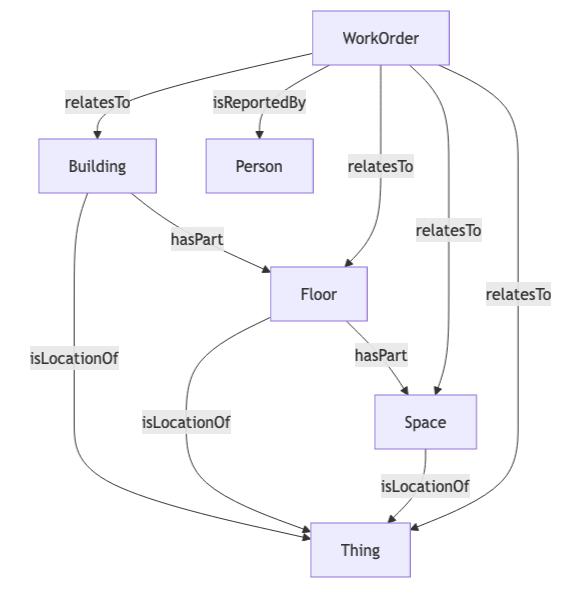
- Asset and location context for maintenance: Relate work orders to the correct building, floor, space, and equipment so downstream apps can act on them.
- Historical and ongoing work order sync: Poll recent work orders automatically and backfill older records when needed.
Configuration
Auth Requirements
The connector authenticates directly to the FSI CMS API and also requires a segment selection so it only works within the intended portion of your FSI environment.
| Field | Required | Description | Where to Find |
|---|---|---|---|
| Username | Yes | FSI CMS username | Provided by your FSI CMS administrator |
| Password | Yes | FSI CMS password | Provided by your FSI CMS administrator |
| Site Code | Yes | FSI site code used for API access | Provided by your FSI CMS administrator |
| Subscription Key | Yes | API subscription key | Provided by your FSI CMS administrator |
| Segment | Yes | The FSI segment whose locations, assets, and work orders should be synced | Select from the connector UI after entering valid credentials |
| Each FSI CMS4 connector can only connect to one Segment at a time. |
Place Mappings
After authentication, the connector loads structured FSI locations and presents them in a mapping table. These mappings determine which places are provisioned in Mapped and which work orders and assets are in scope.
| Mapping Area | Required | Notes |
|---|---|---|
| Building | Yes | Each mapping row must include a building. Buildings are provisioned into Mapped and used as the top-level location scope. |
| Floor | Optional | If included, provide both a floor name and floor level. Floors are created beneath the building. |
| Space | Optional | If included, provide both a space name and a space code. Spaces are created beneath the floor when available. |
Only mapped locations are used for work order polling and backfill.
Asset Mappings
The Asset Mappings step discovers FSI asset categories and lets you map each category to a Mapped exact type.
- Each mapped category becomes a Thing with the selected exact type.
- Categories without a selected mapping are not included in asset sync.
- After saving asset mappings, you can trigger an asset sync for one or more selected buildings.
Advanced Options
| Option | Default | Description |
|---|---|---|
| Work Order Polling | Off | Enables or disables scheduled work order polling. When enabled, the connector polls FSI every 2 minutes. |
| Historical Data Backfill | Date range defaults to last 7 days | Lets you sync historical work orders by date range or by specific work order IDs. Backfill does not interrupt the regular polling cycle. This must use the FSI Work Order Id. |
Mapped Concepts
| FSI CMS Data | Mapped Entity | Notes |
|---|---|---|
| Structured building location | Building | Provisioned from place mappings; receives an FSI external identity. |
| Structured floor location | Floor | Created when floor data is included in the mapping row. |
| Structured space location | Space | Created when space data is included in the mapping row. |
| Asset record | Thing | Exact type comes from the Asset Mappings configuration; includes serial number, location, and FSI asset identities. |
| Asset category / model details | DeviceModel | Added to the asset when model information is available. |
| Asset manufacturer | Agent | Added through the asset's device model when manufacturer data is available. |
| Work order record | WorkOrder | Includes summary, status, priority, category, trade, dates, and FSI external identities. |
| Work order requestor | Person | Created when requestor information is available; email is added when present. |
Sync Behavior
| Function | Frequency | Behavior |
|---|---|---|
| Location Provisioning | On save | Creates the selected building / floor / space hierarchy in Mapped. |
| Asset Sync | On demand | Syncs mapped asset categories for the selected buildings only. |
| Work Order Poll | Every 2 minutes when enabled | Imports recently updated FSI work orders for mapped locations. On first run, it looks back 24 hours. |
| Work Order Backfill | On demand | Imports historical work orders by date range or by specific FSI work order IDs. Long date ranges are processed in smaller batches. |
Sample Code
You can query Work Orders by the connector's ID and identify related assets and places. Read more about Work Orders.
{
workOrders(filter: {connectedDataSourceId: {eq: "your-connector-Id"}}) {
  id
  name
  description
  dateCreated
  mappingKey
  identities {
  	...on ExternalIdentity {
  		__typename
  		value
  	}
  }
  relatesTo {
    ... on Thing {
      id
      name
      exactType
    }
    ... on Building {
      id
      name
      exactType
    }
    ... on Space {
      id
      name
      exactType
    }
  }
}
}
Graph Shape