 Docs Portal
Disruptive Technologies

This connector integrates with the Disruptive Technologies IoT sensor platform. Disruptive Technologies produces small, wireless sensors for environmental monitoring and space utilization — including temperature, humidity, CO₂, motion, and desk occupancy sensors. The connector ingests sensor data into the Mapped Graph, creating device entities with associated timeseries points that represent real-time and historical environmental and occupancy measurements.
Use Cases
- Environmental monitoring: Track temperature, humidity, and CO₂ levels across buildings and spaces to ensure occupant comfort and regulatory compliance.
- Space utilization: Monitor desk occupancy and motion activity to understand how spaces are used and optimize real estate decisions.
- Device health oversight: Monitor sensor battery status, network signal strength, and online/offline connectivity to proactively manage your sensor fleet.
Configuration
Auth Requirements
The connector supports two authentication methods. Choose the one that matches your Disruptive Technologies account setup.
| Method | Fields | Where to Find |
|---|---|---|
| OAuth2 (recommended) | Service Account Email, Account Key ID, Account Key Secret | In the DT Studio under your project's Service Accounts section. Create a Service Account, then create a Key to obtain the Key ID and Secret. |
| Basic Auth | Username (Key ID), Password (Secret) | Same location as OAuth2 — the Key ID is the username and the Key Secret is the password. |
Runtime Mode
| Mode | Description |
|---|---|
| Webhook (Real-time) | Default. Creates a DT Data Connector (HTTP_PUSH) for each project to receive real-time sensor events. Poll supplements webhooks with network signal strength data. |
| Polling (Scheduled) | Fetches full event history for all mapped devices every 10 minutes. No remote webhook is created. |
| # |
Advanced Options
| Option | Default | Description |
|---|---|---|
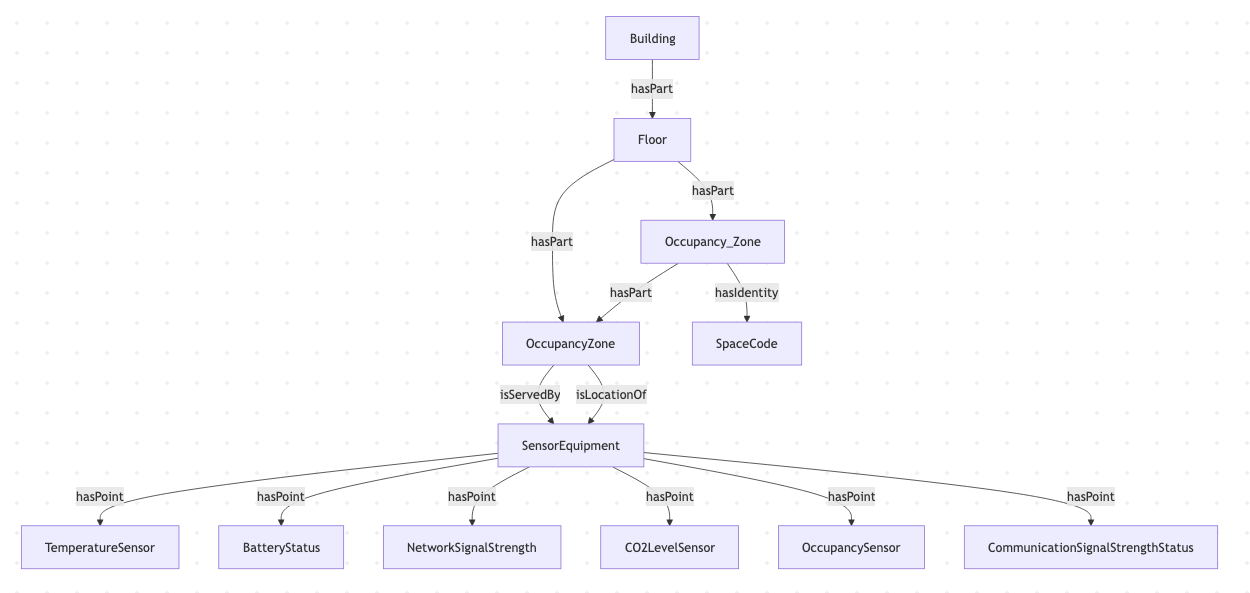
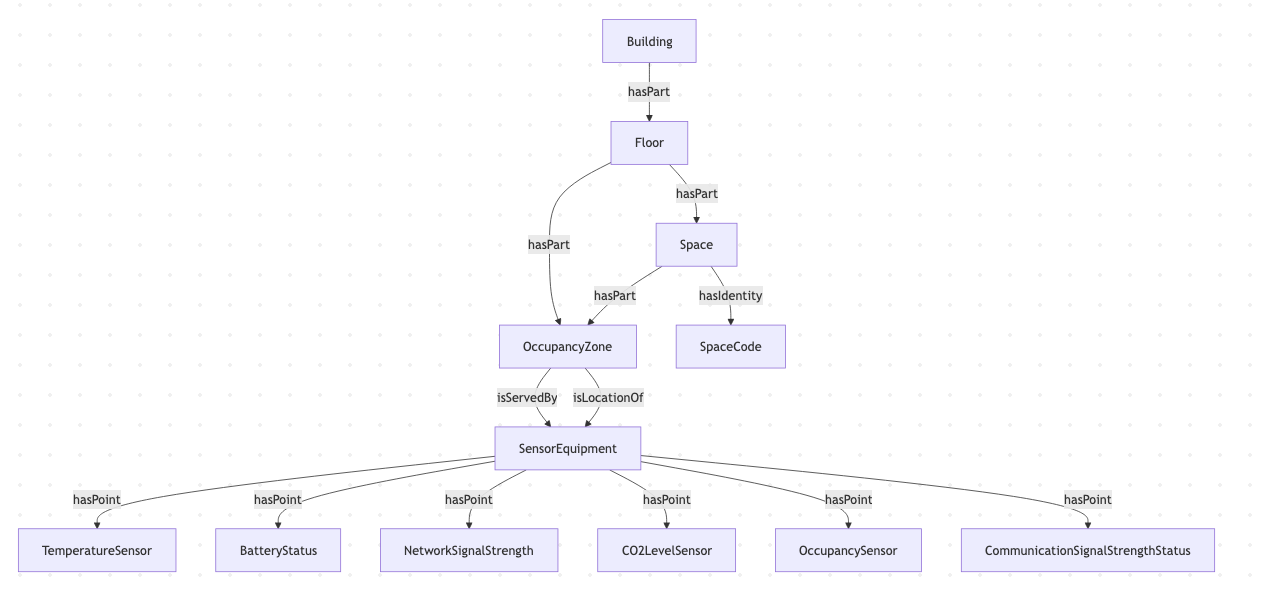
| Materialize Space as Zone | FALSE | When enabled, DT Spaces are represented as OccupancyZone entities in the Graph instead of Space. |
Review the Graph diagrams below for examples of Materialize Space as Zone disabled and enabled.
Place Mapping
The connector uses a mapping table to associate DT sensors with locations in the Mapped graph. When you select one or more DT projects, the connector fetches all supported devices and presents them for mapping.
| Field | Required | Description |
|---|---|---|
| building.siteId | Yes | The Mapped site ID for the building |
| building.address | Yes | Building address |
| building.name | Yes | Building display name |
| subBuilding.name | No | Sub-building name (if applicable) |
| subBuilding.code | No | Sub-building code |
| floor.name | Yes | Floor name |
| floor.level | Yes | Floor level number (0 = ground, negative = basement) |
| space.name | No | Space name (if omitted, device is placed at the floor level) |
| space.code | No | Space code |
| thing.refId | Yes (unique) | The DT device ID — auto-populated from the API |
| thing.name | Yes | Device display name — auto-populated as {type} - {deviceId} |
| thing.context | No (editable) | Device metadata including type and labels from the DT API |
Mapped Concepts
API to Mapped Entities
| DT Concept | Mapped Entity | exactType | Description |
|---|---|---|---|
| DT Project | Building | Building | Each DT project maps to a building in the Mapped graph |
| DT Device (all types) | SensorEquipment | SensorEquipment | Each sensor device becomes a SensorEquipment entity |
| Space | OccupancyZone | OccupancyZone | Motion and desk occupancy sensors create an OccupancyZone that is part of the mapped Space or Floor |
API to Mapped Points
| DT Event Type | Point Name | exactType | Datatype | Unit | Value Description |
|---|---|---|---|---|---|
| temperature | Temperature | TemperatureSensor | DOUBLE | DEG_C | Temperature in degrees Celsius |
| humidity | Humidity | RelativeHumiditySensor | DOUBLE | PERCENT_RH | Relative humidity percentage |
| co2 | CO2 | CO2LevelSensor | DOUBLE | PPM | CO₂ concentration in parts per million |
| motion | Motion | OccupancySensor | ENUM | NUM | 0 = NO_MOTION_DETECTED, 1 = MOTION_DETECTED |
| deskOccupancy | Desk Occupancy | OccupancySensor | ENUM | NUM | 0 = NOT_OCCUPIED, 1 = OCCUPIED |
| batteryStatus | Battery Status | BatteryStatus | DOUBLE | PERCENT | Battery level percentage (all device types) |
| networkStatus | Network Signal Strength | CommunicationSignalStrengthStatus | DOUBLE | PERCENT | Network signal strength percentage (all device types) |
Relationships:
- Each SensorEquipment hasLocation → the Space, Floor, or OccupancyZone where it is installed
- For motion and desk occupancy sensors, the SensorEquipment serves → an OccupancyZone, which isPartOf → the parent Space or Floor
- Each SensorEquipment hasPoint → its timeseries Point entities (main sensor point + battery + network signal)
- Each SensorEquipment and all its Points share a single Heartbeat via hasHeartbeat
Sample Code
Query latest sensor readings
Request ResponseCopy1 2 3 4 5 6 7 8 9 10 11 12 13 14 15 16 17 18{ points(filter: {connectedDataSourceId: {eq: "your-connector-Id"}}) { id name exactType datatype mappingKey unit { id } series(latest: true) { timestamp value { float64Value } } } }
Query Occupancy Zones and their sensors
Request ResponseCopy1 2 3 4 5 6 7 8 9 10 11 12 13 14 15 16 17 18 19 20 21 22 23 24 25{ zones( filter: {connectedDataSourceId: {eq: "your-connector-Id"}, exactType: {eq: "Occupancy_Zone"}} ) { id name exactType mappingKey isServedBy { id name hasPoint { id name exactType mappingKey } } isPartOf { id name exactType } } }
Query sensor devices and their locations
Request ResponseCopy1 2 3 4 5 6 7 8 9 10 11 12 13 14 15 16 17 18 19 20 21 22 23{ things(filter: {connectedDataSourceId: {eq: "your-connector-Id"}}) { id name exactType mappingKey hasLocation { id name exactType } hasPoint { id name exactType mappingKey datatype unit { id } } } }
Graph Diagrams
Default - DT Space as Space
DT Spaces Materialized as Zones
With Materialize Spaces as Zones set to TRUE, the DT Space is rendered as a Zone.