 Docs Portal
Soleran Source

The Soleran Source connector imports data from Soleran CMMS (eAppTrack) into the Mapped graph. It reads buildings, floors, assets (equipment), and Work Orders from your Soleran instance and creates the corresponding entities and relationships in Mapped. The connector polls for work order updates every 5 minutes and supports on-demand asset syncing.
Use Cases
- Facilities visibility: Bring your Soleran building and floor hierarchy into Mapped so all locations are represented in the graph and available for analytics, dashboards, and cross-system correlation.
- Work Order tracking: Automatically sync corrective and preventative work orders into the Mapped graph, including status, priority, assignees, and location context, enabling unified maintenance dashboards across all connected systems.
- Asset management: Import equipment and asset records from Soleran with type classification, manufacturer details, and location assignments so downstream applications can query assets across your portfolio.
Configuration
Auth Requirements
The connector uses Basic Auth credentials to access the Soleran REST API. The following is required:
- API URL: Soleran eAppTrack API base URL, usually https://basic.eapptrack.com/api. Your Soleran administrator can confirm the correct URL for your instance.
- Username: Soleran API username provided by your Soleran administrator. This is the same username used to log in to the eAppTrack web portal.
- Password: Soleran API password, provided by your Soleran administrator.
Module Configuration
| Field | Required | Description |
|---|---|---|
| Building Module | At least one location module required | The Soleran module that contains your building/site records. |
| Floor Module | At least one location module required | The Soleran module that contains your floor/level records. |
| Asset Module | No | The Soleran module that contains your equipment/asset records. Required for asset syncing. |
| Work Order Module | No | The Soleran module that contains your work order records. Required for work order polling. |
Field Configuration
After selecting modules, you map Soleran fields to Mapped properties. The connector UI shows all available fields from each module and lets you assign them to standard Mapped properties.
For each entity type (building, floor, asset, work order), you configure which Soleran field contains each piece of data. For example, you might map:
- The Soleran descriptionx field → the Mapped description property
- The Soleran priorityx field → the Mapped priority property
Some fields are relationship fields which point to records in other modules. The UI allows you to "drill down" into relationship fields to extract values from the linked record. For example, an asset's manufacturer field might be a relationship to a Manufacturers module, and you can configure the connector to follow that relationship and extract the manufacturer's name.
Asset Type Mapping
When the Asset Module is configured, the connector discovers the distinct asset types in your Soleran data and lets you map each one to a Mapped Exact Type (from the Brick Schema ontology). Unmapped types default to Thing.
For example:
| Soleran Type | Mapped exactType |
|---|---|
| HVAC Unit | HVAC |
| Air Handler | AHU |
| Boiler | BOILER |
| Elevator | ELEVATOR |
The connector auto-suggests matches where possible. You can review and adjust them before saving.
Place Mappings
The place mapping table shows all buildings and floors discovered from your Soleran instance. Each row represents a location that will be created in the Mapped graph. You can review the names, addresses, and floor levels before confirming.
Place mappings determine the building → floor hierarchy in the Mapped graph. Work orders and assets are linked to these locations based on their Soleran building/floor references.
| Field | Required | Description |
|---|---|---|
| building.siteId | Yes | The Site in your organization |
| building.name | Yes | Building name |
| building.address | Yes | Building address |
| floor.name | Yes | Floor name (from Mist map/floor plan) |
| floor.level | Yes | Numeric floor level |
Advanced Options
| Option | Default | Description |
|---|---|---|
| Batch Size | 100 | Number of records processed per batch during asset sync. Increase for larger datasets; decrease if you encounter timeouts. |
| Max Retries | 3 | Maximum retry attempts for failed Soleran API requests. |
Mapped Concepts
Entities
The Soleran Source connector creates the following entity types in the Mapped graph:
| Soleran Record | Mapped Entity | exactType | Description |
|---|---|---|---|
| Building record | Building | BUILDING | A physical building or site. |
| Floor record | Floor | FLOOR | A floor or level within a building. |
| Asset/Equipment record | Thing | Various (e.g. HVAC, AHU, BOILER) | An equipment asset. Exact type depends on asset type mapping configuration. |
| Work Order record | WorkOrder | WORK_ORDER | A corrective or preventative maintenance work order. |
| Requestor (from Work Order) | Person | PERSON | The person who reported/requested the work order. Created from requestor email. |
| Creator (from Work Order) | Person | PERSON | The person who created the work order. Created from creator email. |
Relationships
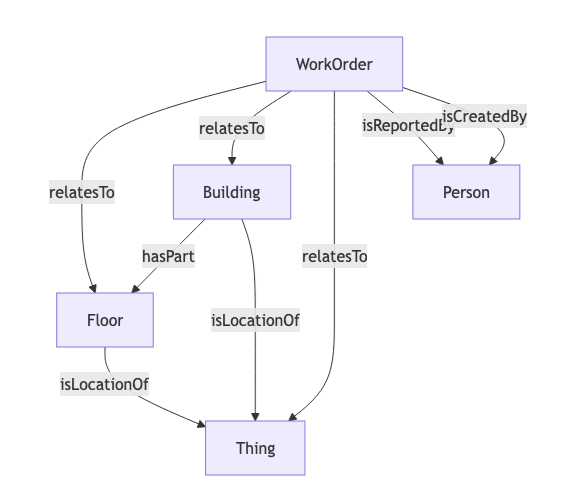
- Building → Floor: Buildings contain floors via the hasPart relationship. This hierarchy is created from the place mapping configuration.
- Thing → Floor/Building: Assets are placed at their floor (preferred) or building location via the hasLocation relationship.
- WorkOrder → Floor/Building: Work orders are linked to their location via relatesTo. Floor takes priority; building is used as fallback.
- WorkOrder → Thing: When a work order references an asset, a relatesTo relationship is created to the corresponding Thing.
- WorkOrder → Person: Requestor and creator are linked via isReportedBy and isCreatedBy respectively. People are deduplicated by email address.
External Identities
Each entity receives an external identity URN for cross-system traceability:
| Identity | Identity Format | Example |
|---|---|---|
| Building | urn:soleran:building:id:<systemid> | urn:soleran:building:id:1234 |
| Floor | urn:soleran:floor:id:<systemid> | urn:soleran:floor:id:5678 |
| Asset | urn:soleran:asset:id:<systemid> | urn:soleran:asset:id:9012 |
| Work Order | urn:soleran:workorder:id:<systemid> | urn:soleran:workorder:id:3456 |
| Work Order | urn:soleran:workorder:number:<number> | urn:soleran:workorder:number:WO-001 |
Polling & Sync Behavior
| Function | Frequency | Description |
|---|---|---|
| Work Order Poll | Every 5 minutes | Fetches work orders updated since the last poll and merges them into the graph. On first run, looks back 24 hours. |
| Asset Sync | On-demand | Triggered manually from the connector UI or via API. Fetches all assets (optionally filtered by building) and merges them into the graph. |
| Provision (Location Sync) | On configuration save | Creates the building/floor hierarchy from place mappings and attaches Soleran external identities for location resolution. |
Sample Code
Note that you can find the connectorId in the Mapped Console grid view connectors tab.
List all work orders from this connector
To find work orders for a specific Building, Floor, or Thing, search the output of this query for the entity's Mapped Id.
Request ResponseCopy1 2 3 4 5 6 7 8 9 10 11 12 13 14 15 16 17 18 19 20 21 22 23 24 25 26 27 28 29 30 31 32 33 34 35 36{ workOrders(filter: {connectedDataSourceId: {eq: "your-connector-id"}}) { id name jobStatus jobPriority jobType description dueDate dateClosed externalDateCreated externalDateUpdated relatesTo { __typename ... on Building { id name } ... on Floor { id name } ... on Thing { id name exactType } } isReportedBy { name } isCreatedBy { name } } }
Graph Diagrams