 Docs Portal
CampusIQ Source

CampusIQ, delivered by Degree Analytics, measures how campus spaces are actually used. This connector brings a school's CampusIQ space hierarchy (Buildings, Floors, and Rooms) into Mapped buildings, and then records the live occupancy count that CampusIQ reports for each of them on a five-minute cadence.
Every space CampusIQ reports on arrives with its own Occupancy Zone and its own occupancy count stream. So, a Building, a Floor and a Room each carry the count CampusIQ measured at that level.
Use Cases
- Drive HVAC and lighting from real occupancy: Feed live counts into Active Control so set points follow how full a space actually is, rather than a fixed schedule.
- Right-size the campus space portfolio: Compare measured utilization across buildings and floors to inform consolidation, scheduling and renovation decisions.
- Give campus operations one space model: CampusIQ's hierarchy lands alongside every other system in the Graph, so occupancy can be queried next to work orders, energy and equipment for the same room.
Configuration
Auth Requirements
CampusIQ uses a single long-lived API key, issued by Degree Analytics as a JWT.
| Field | Required | Where to find it |
|---|---|---|
| API Key | Yes | Issued by your Degree Analytics representative for your school's CampusIQ tenant. |
Notes and caveats:
- The key identifies the school. There is no separate school or site field to configure — the connector reads the school from the key itself.
- The key is validated when you save it: the connector makes a small live request and rejects the key if CampusIQ does not accept it.
- Keys expire. When one does, polling stops and the connector reports an authentication failure; replace the key in this tab to resume.
Connector Entities
Three tabs appear after authentication, and they must be completed in order — each level is attached to the one above it, so a Floor cannot be brought in until its Building has been, and a Room cannot until its Floor has been:
| Tab | Contents | Fields you complete |
|---|---|---|
| Buildings | Every building CampusIQ reports on | Name, Postal Address |
| Floors | Every floor | Name, Floor Level, Building |
| Spaces | Every room | Name, Space Code, Floor |
Notes:
- Postal Address is required and has no default — CampusIQ does not publish addresses. The address is what lets a building match the same building contributed by another connector, so a building cannot be brought in until you supply one.
- Floor Level is pre-filled from CampusIQ's floor label and converted to Mapped's zero-based scale, where the ground floor is level 0. A label that is not a single whole number — G, B1, or a zone spanning several floors — arrives blank for you to set.
- Building and Floor are pre-selected from CampusIQ's own hierarchy. A row arrives blank only where CampusIQ's parent is missing or points at something of the wrong kind; assign it yourself in the grid.
- Space Code defaults to the CampusIQ zone identifier, which is unique across the whole feed. Change it if your rooms should match codes you already use elsewhere.
Advanced Options
| Option | Default | Description |
|---|---|---|
| Page Size | 100 | How many zones CampusIQ returns per request. Lower it only if CampusIQ rate-limits large pages. |
| Batch Size | 250 | How many records are submitted per write while bringing entities into the graph. |
| Base URL | Degree Analytics production | Only change this if Degree Analytics directs you to an alternate host. |
Mapped Concepts
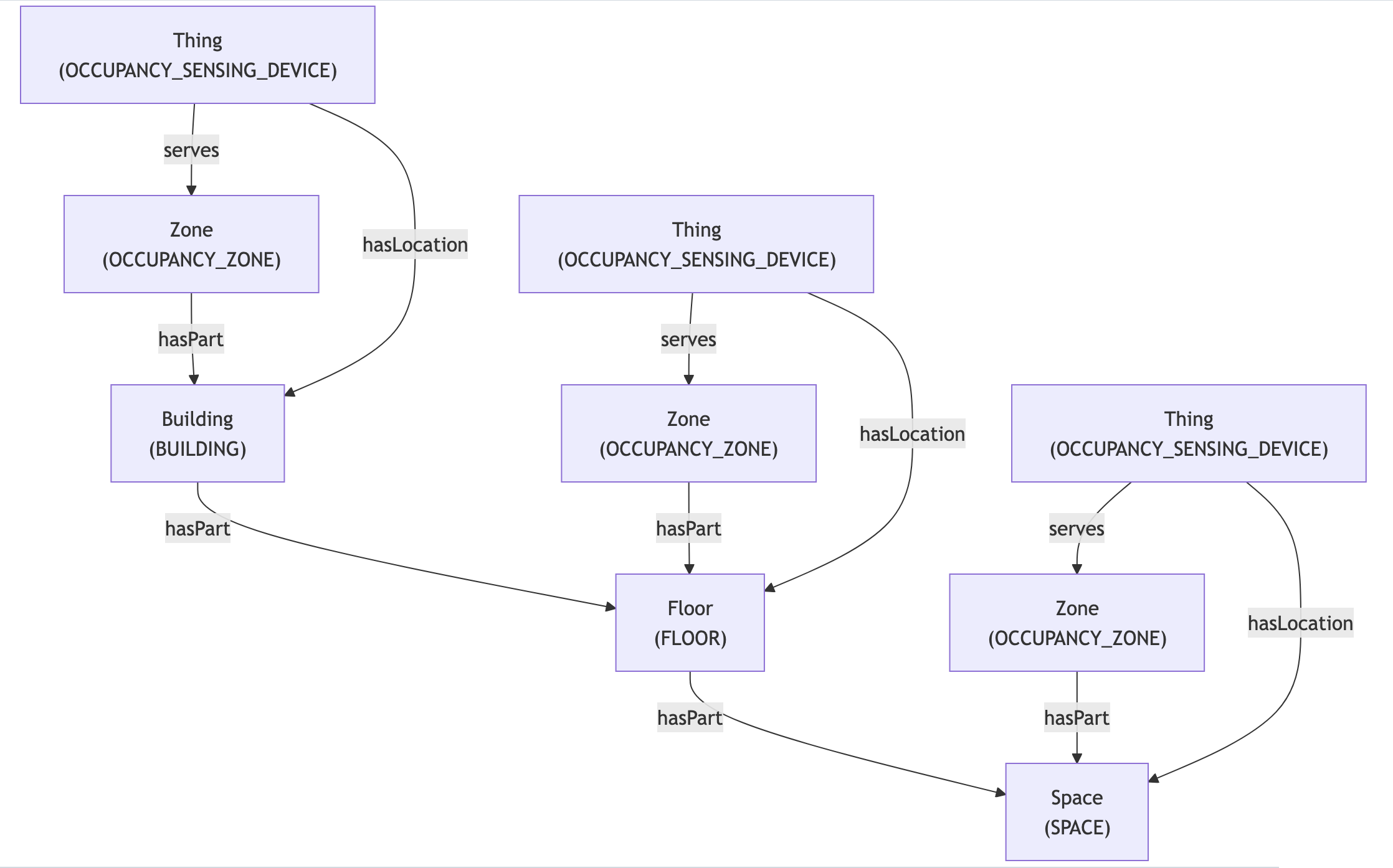
CampusIQ returns one record per zone, and each record carries both the zone's place in the hierarchy and its current occupancy count. Everything below is built from that single feed.
API to Mapped Entities
| CampusIQ record | Mapped entity | exactType | Relationships |
|---|---|---|---|
| Zone, level Building | Building | BUILDING | hasPart its floors |
| Zone, level Floor | Floor | FLOOR | isPartOf its building; hasPart its rooms |
| Zone, level default | Space | SPACE | isPartOf its floor |
| Every Zone above | Zone | OCCUPANCY_ZONE | hasPart the place it measures; isServedBy its sensing device |
| Every zone above | Thing | OCCUPANCY_SENSING_DEVICE | serves the occupancy zone; hasLocation the place |
Notes:
- Occupancy is not something you select. CampusIQ measures every Zone it returns, at that zone's own level, so an occupancy zone is created for each building, floor and room you bring in.
- The sensing device is virtual. CampusIQ reports a number rather than exposing a physical sensor, so the device exists to carry the measurement and is flagged as virtual in the graph.
- Counts are not rolled up. A floor's count is the figure CampusIQ measured for that floor, not the sum of its rooms. Each level reports independently.
Each place also carries identities so it can be recognized across systems: a postal address on buildings, a building-scoped level on floors, a floor-scoped code on rooms, and a CampusIQ identifier on all three.
Sample Code
Query the location hierarchy and Occupancy Zones
Request ResponseCopy1 2 3 4 5 6 7 8 9 10 11 12 13 14 15 16 17 18 19 20 21 22 23 24 25 26 27 28 29 30 31 32 33 34 35 36 37 38 39 40 41 42 43{ buildings(filter: {id: {eq: "your-building-Id"}}) { id name exactType isPartOf( filter: {exactType: {eq: "Occupancy_Zone"}, and: {connectedDataSourceId: {eq: "your-connector-Id"}}} ) { id name exactType mappingKey } hasPart { id name exactType mappingKey isPartOf( filter: {exactType: {eq: "Occupancy_Zone"}, and: {connectedDataSourceId: {eq: "your-connector-Id"}}} ) { id name exactType mappingKey } hasPart { id name exactType mappingKey isPartOf( filter: {exactType: {eq: "Occupancy_Zone"}, and: {connectedDataSourceId: {eq: "your-connector-Id"}}} ) { id name exactType mappingKey } } } } }
Query Occupancy Zones with Occupancy Sensing Devices and Sensors
Request ResponseCopy1 2 3 4 5 6 7 8 9 10 11 12 13 14 15 16 17 18 19 20 21 22 23 24 25 26 27 28 29 30 31 32 33 34{ zones(filter: {connectedDataSourceId: {eq: "your-connector-Id"}}) { id name exactType mappingKey isServedBy { ... on Thing { id name exactType mappingKey hasPoint { id name exactType mappingKey series(latest: true) { timestamp ingestionTime value { float64Value } } } } } hasPart { id name exactType } } }
Query Occupancy Sensing Devices with Zones and Points
Request ResponseCopy1 2 3 4 5 6 7 8 9 10 11 12 13 14 15 16 17 18 19 20 21 22 23 24 25 26 27 28 29 30 31 32 33 34 35 36{ things(filter: {connectedDataSourceId: {eq: "your-connector-Id"}}) { id name exactType mappingKey serves { ... on Zone { id name exactType mappingKey hasPart { id name exactType mappingKey } } } hasPoint { id name exactType mappingKey datatype series(latest: true) { timestamp ingestionTime value { float64Value } } } } }
Graph Diagrams