 Docs Portal
Crestron XiO

The Crestron XiO connector links your Crestron equipment to Mapped, enabling room occupancy insights based on data from your Crestron system.
Use Cases
- Monitor room occupancy status from Crestron touch panels in near real time.
- Use occupancy data in automations, dashboards, and analytics workflows.
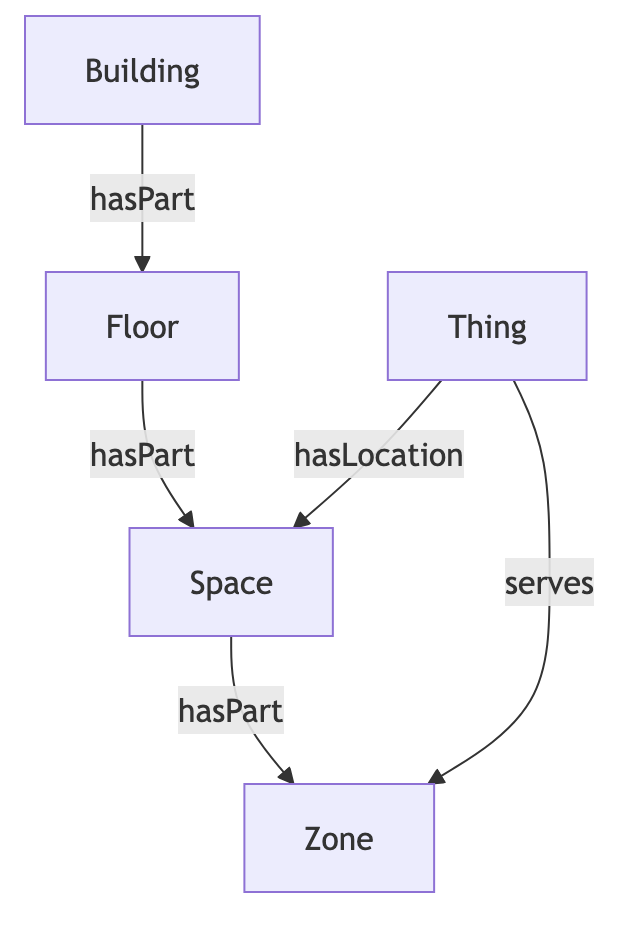
- Relate panel occupancy telemetry to building, floor, and space context in the graph.
Configuration
Auth Requirements
Provide credentials for your Crestron XiO Cloud account.
| Field | Required | Description | Where to find it |
|---|---|---|---|
| API Key | Yes | XiO subscription key used to authenticate API requests | Crestron XiO Cloud developer/admin portal |
| Account ID | Yes | XiO account identifier for device and status queries | Crestron XiO Cloud account settings |
Place Mappings
Use the mapping table to select and map touch panels into your place hierarchy.
| Mapping Field | Required | Notes |
|---|---|---|
| building.siteId | Yes | Building site identifier |
| building.name | Yes | Building display name |
| building.address | Yes | Building address |
| floor.level | Yes | Numeric floor level |
| floor.name | No | Optional floor name |
| space.name | Yes | Space display name |
| space.code | No | Optional space code |
| thing.name | Yes | Device name |
| thing.refId | Yes | Unique source device identifier |
Only devices categorized as touch panels are presented for mapping.
Advanced Options
This may be enabled via the JSON mode editor.
| Option | Default | Description |
|---|---|---|
| addOccupancyZones | Disabled (FALSE) | When enabled, creates occupancy zone entities for mapped locations and links devices as serving those zones. |
Mapped Concepts
API to Mapped Entities
| Source Model | Mapped Entity | Exact Type Notes | Relationships |
|---|---|---|---|
| XiO device (TouchPanel) | Thing | Uses connector defaults for a device entity (no custom exactType override) | hasLocation to mapped Place (Space, Floor, or Building) |
| Mapped location context (optional mode) | Place (Zone) | Uses connector defaults for occupancy zone entity (no custom exactType override) | Place hasPart Zone, Thing serves Zone |
| XiO device identity | Identity | External identity in org scope | Thing identities |
API to Mapped Points
| Source Property | Mapped Point | Datatype | Unit | Description |
|---|---|---|---|---|
| device.occupancy-status | Occupancy status point per mapped device | INT | NUM | Encodes occupancy state as 0 (Vacant), 1 (Occupied), 2 (Null/unknown) |
Enumerations
The occupancy point uses these status mappings:
- 0 = VACANT
- 1 = OCCUPIED
- 2 = NULL (used when status is null or unexpected)
Sample Code
Query latest occupancy time series
Request ResponseCopy1 2 3 4 5 6 7 8 9 10 11 12 13 14 15 16 17 18 19{ points(filter: {connectedDataSourceId: {eq: "your-connector-Id"}}) { id name exactType datatype mappingKey unit { id } valueMap series(latest: true) { timestamp value { int64Value } } } }
Graph Shape