 Docs Portal
EnergyCAP SmartAnalytics (Wattics)

The EnergyCAP connector integrates with the EnergyCAP Wattics API to sync energy, gas, and water meter data into the Mapped Graph. This enriches the building with utility-grade metering data, enabling analysis across energy, sustainability, and cost domains.
Use Cases
- Track electricity, natural gas, and water consumption per meter over time to support sustainability reporting and energy benchmarking.
- Monitor real-time electrical demand (active, reactive, and apparent power) to detect anomalies and optimize load management.
- Correlate utility costs per interval against occupancy and operational schedules to identify savings opportunities.
Configuration
Auth Requirements
This connector requires the following credentials:
| Field | Required | Description |
|---|---|---|
| API Key | ✅ Yes | The API key from your EnergyCAP Wattics account. Found in your Wattics account settings or provided by your EnergyCAP administrator. |
You can read more with EnergyCAP Developer documentation.
Polling Options
After entering your API key you must select at least one type of data to poll. These options control which data the connector collects.
| Option | Description |
|---|---|
| Poll Consumption Data | Enables collection of interval consumption data (kWh for electricity, ft³ for gas, gallons for water) per meter. |
| Poll Cost Data | Enables collection of interval utility cost data (USD) per meter. |
| Poll Raw Data | Enables collection of real-time electrical interval data (active, reactive, and apparent power in watts). Only applies to electricity meters. |
At least one option must be selected before meter mappings can be configured.
Place Mappings
After selecting polling options, configure which meters to sync by selecting them from the source system. The connector fetches all meters visible to your API key and presents them for selection.
| Field | Required | Description |
|---|---|---|
| Building Site ID | Yes | The unique site ID from EnergyCAP that corresponds to the building. |
| Building Ref ID | Yes | An external reference ID for the building. |
| Building Name | Yes | The display name of the building as it appears in EnergyCAP. |
| Building Address | Yes | The address of the building. |
| Meter Name | Yes | The display name for the meter as it appears in EnergyCAP. |
| Meter Ref ID | Yes (unique) | The unique meter ID from EnergyCAP. Must be unique across all configured mappings. |
| Meter Context | Optional | Auto-populated from the source system with meter type (electricity, gas, or water) and reference data. |
Only electricity, gas, and water meter types are supported. Other meter types (e.g. thermal) are excluded from the selection list.
Mapped Concepts
API to Mapped Entities
The connector transforms EnergyCAP meters into Mapped Thing entities with meter-specific exactType values. Each meter is linked to its building and configured with one or more timeseries points depending on the polling options enabled.
| EnergyCAP Meter Type | Mapped Entity exactType | Description |
|---|---|---|
| Electricity | ElectricalMeter | An electrical utility meter. Created for both raw data and cost/consumption polls. |
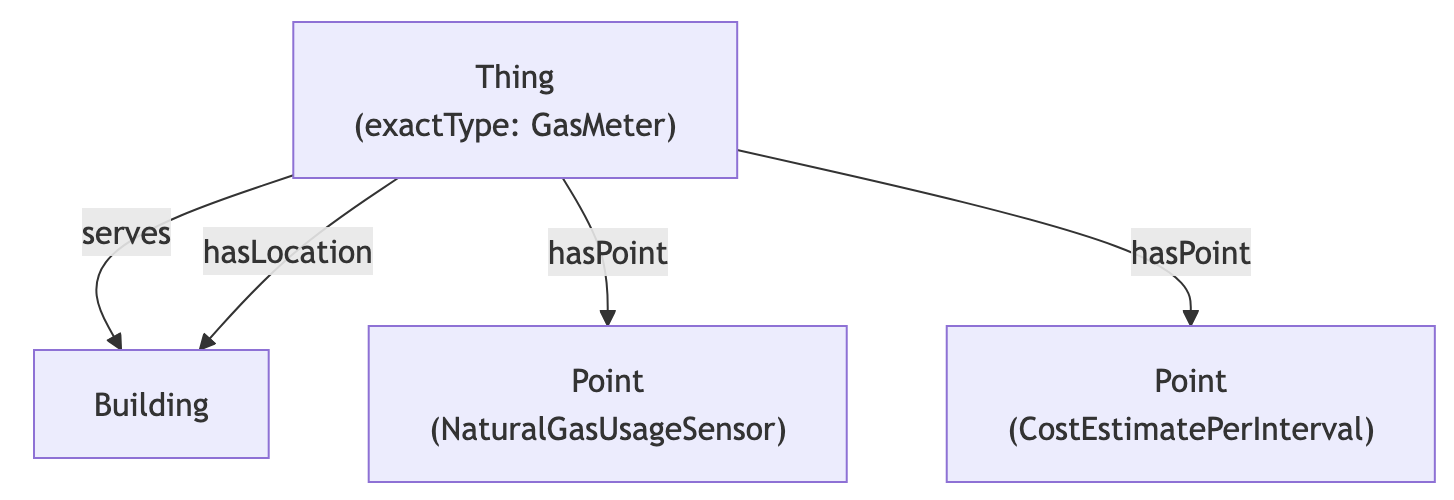
| Gas | GasMeter | A natural gas utility meter. Created for cost/consumption polls only. |
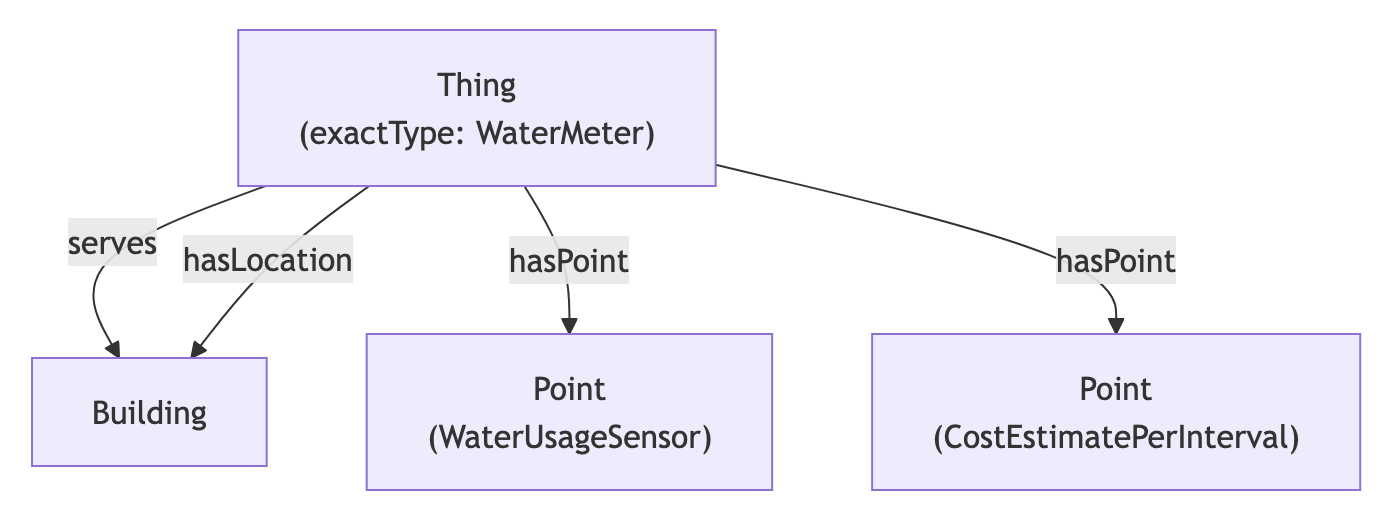
| Water | WaterMeter | A water utility meter. Created for cost/consumption polls only. |
Each meter entity:
- Is linked to its building via serves and hasLocation relationships.
- Carries an external identity (identities) scoped to the organization, in the form urn:energycap:meter:id:<meterId>.
- Has one or more Point entities attached via hasPoint, depending on the polling options configured.
API to Mapped Points
API to Mapped Points
The connector creates timeseries points on each meter entity based on enabled polling options. The points differ by meter type.
Electricity Meters — Cost & Consumption Poll
| Point Name | exactType | Datatype | Unit | Description |
|---|---|---|---|---|
| Energy Consumption | EnergySensor | DOUBLE | KiloW-HR | Electricity consumed per interval (kWh). |
| Energy Cost | CostEstimatePerInterval | DOUBLE | CCY_USD | Utility cost for electricity per interval (USD). |
Gas Meters — Cost & Consumption Poll
| Point Name | exactType | Datatype | Unit | Description |
|---|---|---|---|---|
| Gas Consumption | NaturalGasUsageSensor | DOUBLE | FT3 | Natural gas consumed per interval (cubic feet). |
| Gas Cost | CostEstimatePerInterval | DOUBLE | CCY_USD | Utility cost for gas per interval (USD). |
Water Meters — Cost & Consumption Poll
| Point Name | exactType | Datatype | Unit | Description |
|---|---|---|---|---|
| Water Consumption | WaterUsageSensor | DOUBLE | GAL_US | Water consumed per interval (US gallons). |
| Water Cost | CostEstimatePerInterval | DOUBLE | CCY_USD | Utility cost for water per interval (USD). |
Electricity Meters — Raw Data Poll
| Point Name | exactType | Datatype | Unit | Description |
|---|---|---|---|---|
| Active Power | ActivePowerSensor | INT | W | Total active power reported by the electrical meter (watts). |
| Reactive Power | ReactivePowerSensor | INT | W | Total reactive power reported by the electrical meter (watts). |
| Apparent Power | ApparentPowerSensor | INT | W | Total apparent power reported by the electrical meter (watts). |
Note: Raw Data polling only applies to electricity meters. Gas and water meters do not expose interval power data via the EnergyCAP API; their data is available only through the consumption and cost poll.
Sample Code
Get the latest trends for all meters
Request ResponseCopy1 2 3 4 5 6 7 8 9 10 11 12 13 14 15 16 17{ points(filter: {connectedDataSourceId: {eq: "your-connector-Id"}}) { id name exactType mappingKey unit { id } series(latest: true) { timestamp value { int64Value } } } }
Get hourly energy consumption for all electrical meters over a date range
Request ResponseCopy1 2 3 4 5 6 7 8 9 10 11 12 13 14 15 16 17 18 19 20 21 22 23 24 25 26 27 28{ things( filter: {connectedDataSourceId: {eq: "your-connector-Id"}, exactType: {eq: "Electrical_Meter"}} ) { id name exactType mappingKey hasPoint { id name exactType mappingKey aggregation( startTime: "2026-07-27T00:00:00Z" endTime: "2026-07-28T00:00:00Z" period: HOUR ) { timestamp sum avg min max count } } } }
Get active power timeseries for an electrical meter
Request ResponseCopy1 2 3 4 5 6 7 8 9 10 11 12 13 14 15 16 17 18 19{ points( filter: {connectedDataSourceId: {eq: "your-connector-Id"}, exactType: {eq: "Active_Power_Sensor"}} ) { id name exactType mappingKey unit { id } series(latest: true) { timestamp value { int64Value } } } }
Get utility cost data for all meters
Request ResponseCopy1 2 3 4 5 6 7 8 9 10 11 12 13 14 15 16 17 18 19 20 21 22 23 24 25 26 27{ points( filter: {connectedDataSourceId: {eq: "your-connector-Id"}, exactType: {eq: "Cost_Estimate_Per_Interval"}} ) { id name exactType unit { id } mappingKey isPointOf { ... on Thing { id name exactType mappingKey } } series(latest: true) { timestamp value { int64Value } } } }
Graph Shape
Electricity Meter

Gas Meter
Water Meter