 Docs Portal
Cisco Spaces

The Cisco Spaces connector streams occupancy counts from Cisco Spaces into Mapped. It maps Cisco building and floor locations into the graph, creates virtual occupancy sensing devices and occupancy zones where Cisco provides coverage-area events, and writes people-count time series for downstream analytics and dashboards.
Use Cases
- Monitor live occupancy at the building, floor, or coverage-area level from Cisco Spaces events
- Analyze historical people-count trends for space utilization and capacity planning
- Relate Cisco Spaces occupancy data to other Mapped entities for automation and reporting
Configuration
Auth Requirements
The connector is activated with a Cisco Spaces Activation Token. During setup, the connector exchanges that token for the tenant-specific API key and base URL it uses afterward.
| Field | Required | Description | Where to Find |
|---|---|---|---|
| Activation Token | Yes | Token used to activate the Cisco Spaces app for a single tenant | Cisco Spaces partner app activation flow for your tenant |
After activation, the connector stores the generated API key securely and does not require the user to enter it manually.
Place Mappings
The place mapping table associates Cisco Spaces locations with the Mapped place hierarchy. Building fields are required. Floor fields are optional, so you can map either building-level totals or floor-level/zone-level occupancy.
| Field | Required | Description |
|---|---|---|
| building.siteId | Yes | Mapped site identifier for the building |
| building.address | Yes | Building address shown in the Mapped graph |
| building.refId | Yes | Cisco Spaces building location ID |
| building.name | Yes | Building name |
| floor.name | No | Floor display name |
| floor.level | No | Floor number stored as a zero-indexed level in Mapped |
| floor.refId | No | Cisco Spaces floor location ID |
Mapped Concepts
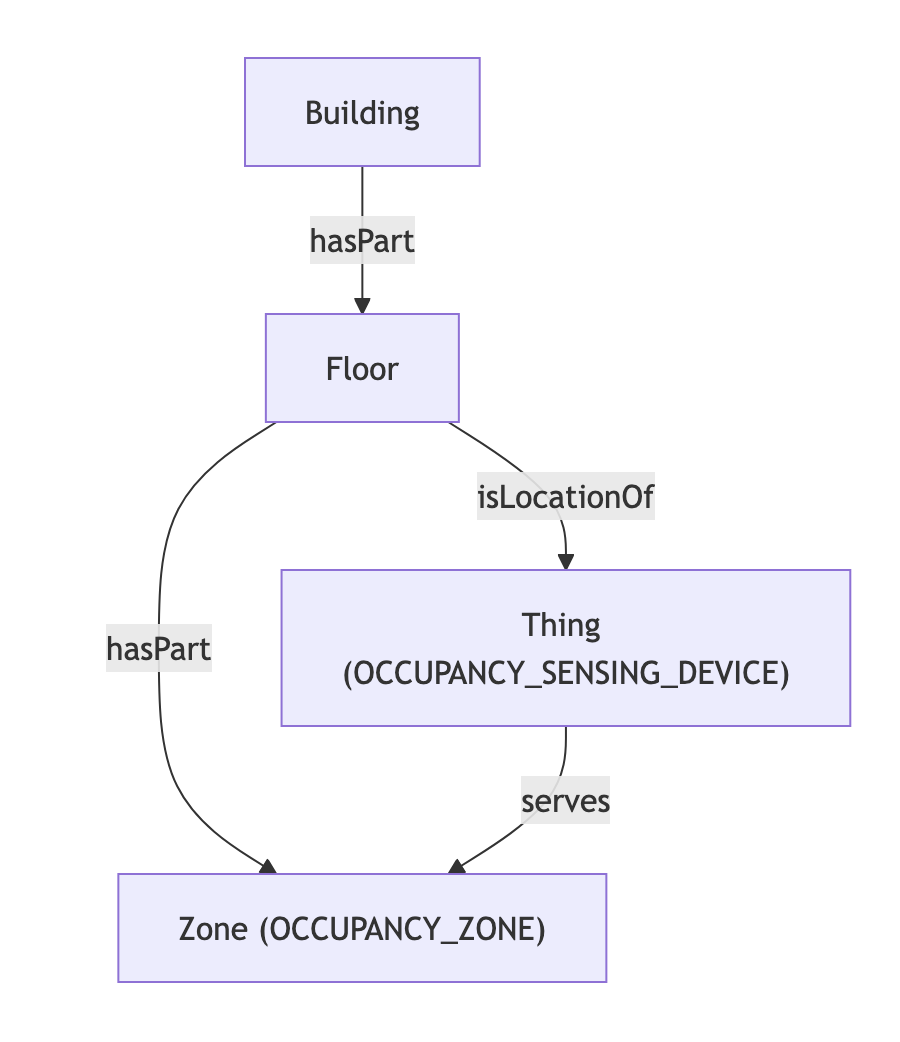
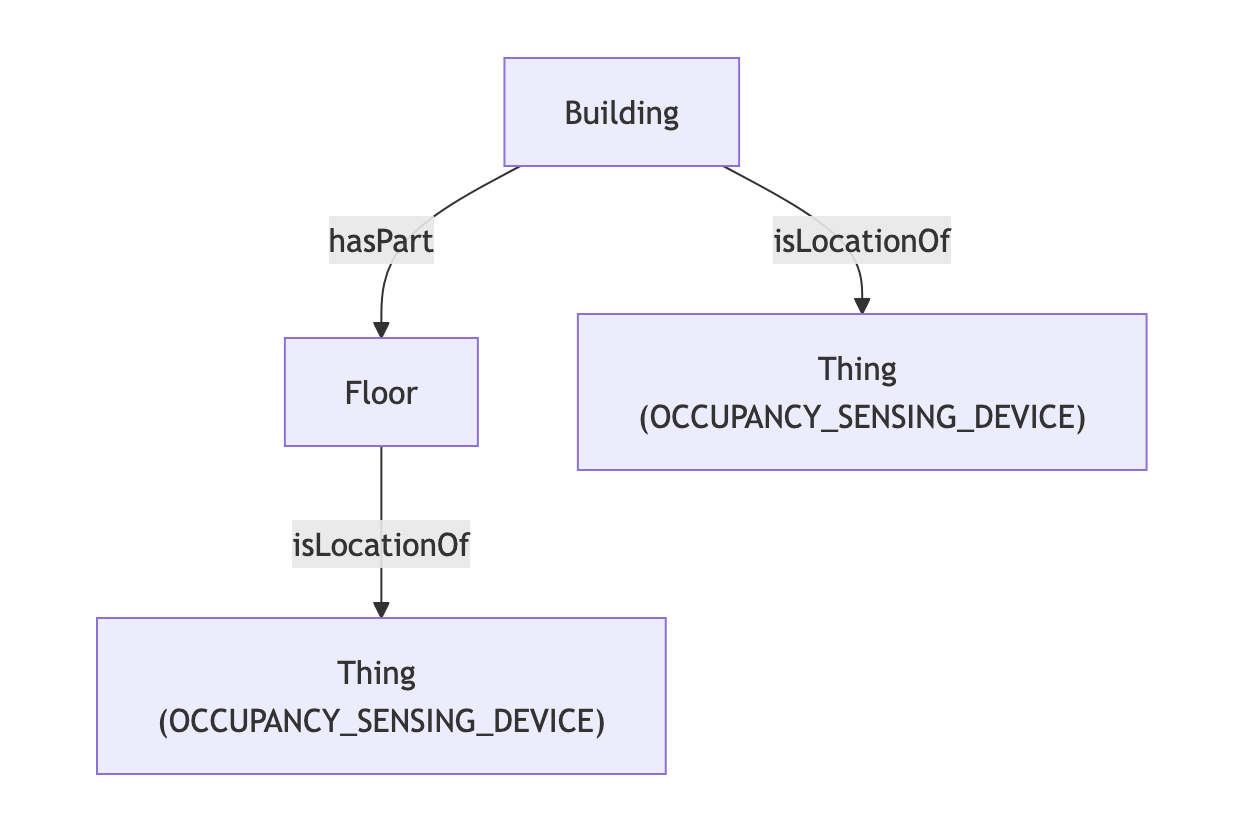
The connector consumes Cisco Spaces DEVICE_COUNT events and turns them into place-aware occupancy entities and time series. The resulting graph shape depends on whether Cisco reports occupancy for a building, a floor, or a coverage area within a floor.
API to Mapped
| Cisco Spaces source | Mapped entity | exactType | Description |
|---|---|---|---|
| Building location | Building | Building | Parent place in the mapped hierarchy |
| Floor location | Floor | Floor | Child place beneath a building |
| Coverage area / zone location | Zone | OCCUPANCY_ZONE | Occupancy zone created when Cisco sends zone-level events |
| Virtual occupancy sensor for a building or floor | Thing | OCCUPANCY_SENSING_DEVICE | Virtual device located on the parent building or floor |
Relationship summary
- Floors belong to buildings through hasPart
- Coverage areas belong to their parent building or floor through hasPart
- Virtual occupancy sensing devices are attached to their parent building or floor through isLocationOf
- When coverage areas exist, the virtual occupancy sensing device serves those zones
- Cisco location IDs are stored in identities so connector-created entities can be matched back to Cisco Spaces
API to Mapped Points
| Cisco Spaces data | Mapped point | exactType | Parent entity | Datatype | Unit | Description |
|---|---|---|---|---|---|---|
| Building or floor device count | Point | PEOPLE_COUNT_SENSOR | Building or Floor | INT | NUM | People count written directly on the parent place when Cisco emits non-zone totals |
| Coverage-area device count | Point | PEOPLE_COUNT_SENSOR | Zone | INT | NUM | People count for an occupancy zone / coverage area |
| Mirrored device-count stream | Point | PEOPLE_COUNT_SENSOR | Thing (OCCUPANCY_SENSING_DEVICE) | INT | NUM | Same Cisco Spaces occupancy event stream attached to the virtual occupancy sensing device |
Occupancy values are streamed continuously from Cisco Spaces rather than collected by a scheduled telemetry poll. The connector poll cycle runs every 150 seconds to maintain connector health reporting and reconnection behavior.
Sample Code
Query Cisco Spaces virtual occupancy sensing devices and their served Zones
Request ResponseCopy1 2 3 4 5 6 7 8 9 10 11 12 13 14 15 16 17 18 19 20 21 22 23 24 25 26 27 28 29 30 31 32{ things(filter: {connectedDataSourceId: {eq: "your-connector-id"}}) { id name exactType mappingKey isVirtual hasLocation { id name exactType } serves { ... on Zone { id name exactType mappingKey } } hasPoint { id name exactType mappingKey datatype unit { id } } } }
Get the latest people-count value for all Cisco Spaces Points
Request ResponseCopy1 2 3 4 5 6 7 8 9 10 11 12 13 14 15 16 17 18 19 20 21 22 23 24 25 26 27 28 29 30 31 32{ points(filter: {connectedDataSourceId: {eq: "your-connector-Id"}}) { id name exactType mappingKey datatype unit { id } isPointOf { ... on Zone { id name exactType mappingKey } ... on Thing { id name exactType mappingKey } } series(latest: true) { timestamp value { float64Value } } } }
Graph Diagrams