 Docs Portal
Nuvolo Destination

The Nuvolo Destination connector sends Mapped work orders and assets into Nuvolo CMMS. It polls the Mapped graph every 2 minutes for eligible work orders, supports on-demand asset sync, and can backfill historical work orders into Nuvolo for selected buildings.
Use Cases
- Route Mapped work orders into Nuvolo: Forward corrective-maintenance work orders from Mapped into Nuvolo for execution by facilities teams.
- Push asset records to Nuvolo on demand: Publish Mapped assets for selected buildings into Nuvolo device records.
- Support staged cutovers and migrations: Use date-range or ID-based backfill to load historical work orders without waiting for the normal poll cycle.
Configuration
Auth Requirements
| Field | Required | Description | Where to Find |
|---|---|---|---|
| Base URL | Yes | Your Nuvolo instance base URL | Your Nuvolo administrator (for example https://your-instance.service-now.com) |
| Client ID | Yes | OAuth client ID used for Nuvolo API access | Nuvolo / ServiceNow application registration or integration setup |
| Client Secret | Yes | OAuth client secret | Nuvolo / ServiceNow application registration or integration setup |
| Username | Yes | Nuvolo username with permission to create and update work orders and devices | Nuvolo administrator |
| Password | Yes | Password for the API user | Nuvolo administrator |
Place Mappings
This destination uses building scope selection to decide which Work Orders should be published.
| Setting | Required | Description |
|---|---|---|
| Selected Buildings (Workorder Sync Settings) | Yes | Buildings whose related corrective-maintenance work orders are eligible for regular polling and publish |
| Selected Buildings (Asset Sync action) | Yes, per run | Buildings that scope each manual asset sync |
| Selected Buildings (Workorder Backfill action) | Yes, per run | Buildings that scope each manual work order backfill |
Records outside the selected buildings are skipped.
Workorder Sync Settings
On this tab, the Buildings in scope must be selected, identifying keys must be configured, and enum values can be mapped from source to destination values.
| Option | Required | Description |
|---|---|---|
| Workorder - Sync Token Key | Yes | Nuvolo Work Order field key used to store the connector's tracking identity for synced Work Orders |
| Workorder - Custom Name Key | Yes | Nuvolo Work Order field key used to store a human-readable external reference alongside the Work Order name |
| Mapping | Purpose |
|---|---|
| Status | Maps Mapped jobStatus values to Nuvolo Work Order states |
| SubStatus | Maps Mapped jobSubStatus values to Nuvolo sub-status values |
| Type | Maps Mapped jobType values to Nuvolo Work Order types |
| RequestType | Maps Mapped sector values to Nuvolo request types |
| Service | Maps Mapped problemDescription values to Nuvolo services needed |
Important notes:
- Only Work Orders mapped to Nuvolo's Corrective Maintenance Work Order type are published.
- Work Order backfill uses the same mappings and the same eligibility rules as the regular poll.
Asset Sync Settings
On this tab, an on-demand asset sync can be executed for buildings selected by date, or for specific Nuvolo asset Ids.
| Option | Required | Description |
|---|---|---|
| Asset - Sync Token Key | Yes | Nuvolo asset field key used to store the connector's tracking identity for synced assets |
| Asset - Reference URL Key | Yes | Nuvolo asset field key that receives the asset's reference URL from Mapped |
Asset type mappings can also be configured.
| Mapping | Purpose |
|---|---|
| AssetType | Maps Mapped exactType values to Nuvolo asset types |
| OwningDepartments | Maps the asset's responsible group to a Nuvolo department |
If manufacturer or model records do not already exist in Nuvolo, the connector can create matching manufacturer and model records before publishing the asset.
Workorder Backfill
Use this tab to re-publish Work Orders from the Mapped Graph to the Nuvolo CMMS, by date range or by Mapped Work Order Id.
Mapped Concepts
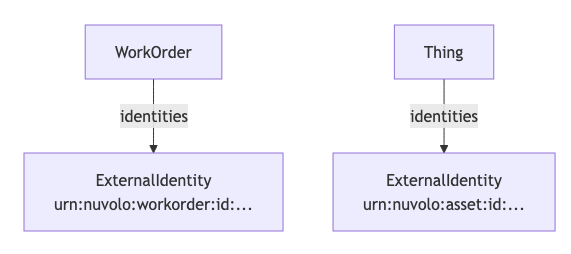
API to Mapped Entities
| Mapped Entity | Nuvolo Record | What the connector changes in Mapped |
|---|---|---|
| WorkOrder | x_nuvo_eam_facilities_work_orders | Adds a Nuvolo Work Order identity after a successful publish |
| Thing | x_nuvo_eam_facilities_devices | Adds a Nuvolo asset identity after a successful asset sync |
Syncing Requirements for Work Orders
- Work orders must relate to the selected buildings and must have jobType value Corrective Maintenance.
- Assets must have a location that resolves to one of the selected buildings.
- The connector uses the stored Nuvolo identities to avoid duplicate creation on later syncs. Updates to existing Work Orders are skipped.
Sample Code
Query Work Orders
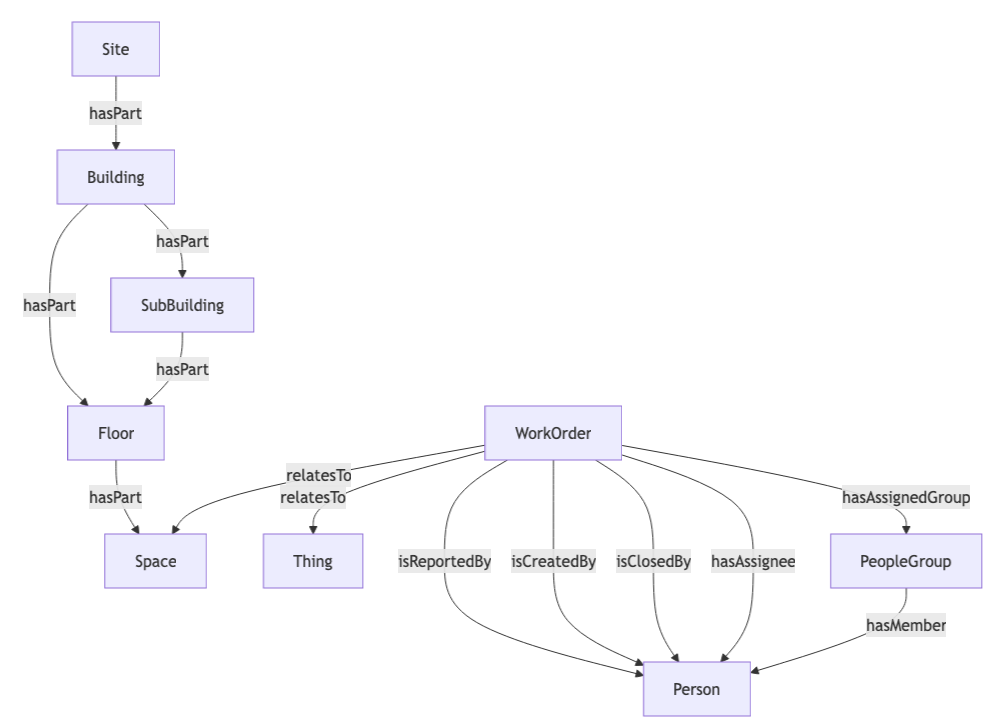
Read more about how to query Work Orders in the Mapped Graph.
Request ResponseCopy1 2 3 4 5 6 7 8 9 10 11 12 13 14 15 16 17 18 19 20 21 22 23 24 25 26 27 28 29 30 31 32 33 34 35 36 37 38 39 40 41 42 43 44 45 46 47 48 49 50 51 52 53 54 55 56 57 58 59 60 61 62 63 64 65 66 67 68 69 70 71 72 73 74 75 76 77 78 79{ workOrders(filter: {connectedDataSourceId: {eq: "your-connector-Id"}}) { id name mappingKey summary description jobStatus jobSubStatus jobPriority jobType sector dueDate dateClosed externalDateCreated externalDateUpdated problemDescription resolutionDescription isReportedBy { name emails { address } } isCreatedBy { name emails { address } } isClosedBy { name emails { address } } hasAssignee { name emails { address } } hasAssignedGroup { name hasMember { name } } relatesTo { __typename ... on Building { id name } ... on Floor { id name level } ... on Space { id name exactType } ... on Thing { id name exactType } } identities { __typename ... on ExternalIdentity { value scope } } } }
Graph Diagrams