 Docs Portal
Redfish Source

The Redfish Source connector integrates with any DMTF Redfish-compatible server management platform, including Dell iDRAC, HPE iLO, and Lenovo XCC. It automatically discovers server hardware and models each chassis in Mapped, including its associated server and Baseboard Management Controller (BMC).
Every five minutes, the connector collects sensor and health information, including temperature, fan, voltage, power, and hardware status data.
To support environments where management networks are restricted to the data center, data collection runs on a Mapped Connector Host within your network. Your Redfish credentials and management traffic never leave your environment. Only the collected device and sensor data is securely transmitted to Mapped.
Use Cases
- Datacenter environmental monitoring: Track chassis intake temperature, fan speed, voltage, and power draw per server enclosure alongside every other environmental signal in the graph.
- Hardware health visibility: Surface each chassis, server, and BMC's reported health status (OK / Warning / Critical) so failing hardware shows up next to the facility data teams already monitor.
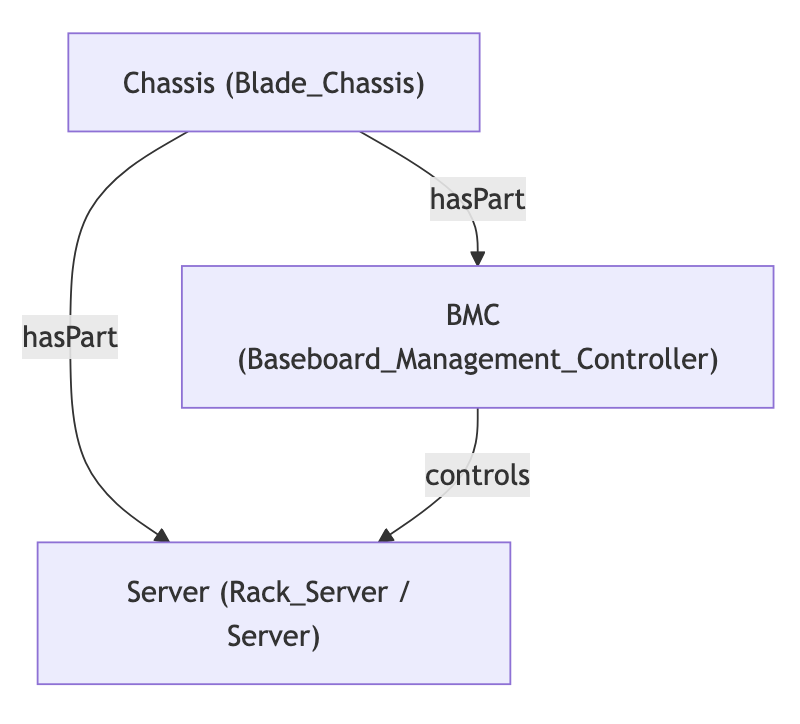
- Asset and topology mapping: See which server and BMC live in which chassis, and which servers each BMC manages, without maintaining that topology by hand.
Configuration
Auth Requirements
| Field | Required | Description | Where to Find |
|---|---|---|---|
| Base URL | Yes | The Redfish service root's base URL (e.g. https://10.1.2.3 or your BMC's hostname) | Your BMC's/Redfish endpoint's network address |
| Auth Method | Yes | Basic or Session — how the connector authenticates each request | Choose based on what your device supports (see below) |
| Username | Yes | Redfish account username | Your BMC's administrative account |
| Password | Yes | Redfish account password | Same account |
Session (the default and recommended choice for most devices) exchanges your username and password once for a session token, and the connector automatically re-authenticates if that session expires mid-run. Basic sends your username and password with every single request instead — use it only if your device doesn't support Redfish session authentication.
Place Mappings
This connector does not map onto an existing place hierarchy — Redfish has no concept of buildings or floors. After authenticating, one tab appears so you can review and approve what the connector found before it's added to your graph:
| Tab | Contents |
|---|---|
| Chassis | Every Redfish Chassis (enclosure) discovered |
Chassis is the only device here with an actual physical location, so it's the only one you review directly. Every ComputerSystem (physical server) and Manager (BMC) that Redfish's own Links connect to a chassis is brought in automatically as a part of that chassis the moment you approve it — there's nothing separate to find or approve for them, and no ordering to get right.
Each chassis row has an optional Location field — pick an existing Building, Sub-building, Floor, Space, or Zone in your graph if you want this hardware placed somewhere physical. Nothing here is derived or guessed: Redfish carries no location data at all, so leaving it blank is fine and saves the chassis (and everything folded into it) unplaced.
Mapped Concepts
API to Mapped Entities
| Redfish Source | Mapped Entity | exactType | Relationship |
|---|---|---|---|
| Chassis | Thing | Blade_Chassis | hasLocation → the Building/Sub-building/Floor/Space/Zone you picked (optional — see Place Mappings) |
| ComputerSystem (Physical) | Thing | Rack_Server | isPartOf (hasPart from the chassis side) → the Chassis whose Redfish Links.Chassis names it |
| ComputerSystem (other) | Thing | Server | isPartOf (hasPart from the chassis side) → the Chassis whose Redfish Links.Chassis names it |
| Manager | Thing | Baseboard_Management_Controller | isPartOf (hasPart from the chassis side) → the Chassis whose Redfish Links.ManagerForChassis names it; also controls → the servers it manages (from Links.ManagerForServers) |
Only Chassis is imported/merged as its own entity — a ComputerSystem or Manager that no chassis links to is not brought in at all (see Place Mappings above).
Sample Code
Query Chassis with the servers and BMC(s)
Request ResponseCopy1 2 3 4 5 6 7 8 9 10 11 12 13 14 15 16 17 18 19 20 21 22{ things( filter: {connectedDataSourceId: {eq: "your-connector-Id"}, and: {exactType: {eq: "Blade_Chassis"}}} ) { id name exactType mappingKey hasPart { id name exactType mappingKey } isControlledBy { id name exactType mappingKey } } }
Query BMCs and everything they control
Request ResponseCopy1 2 3 4 5 6 7 8 9 10 11 12 13 14 15 16 17 18{ things( filter: {connectedDataSourceId: {eq: "your-connector-Id"}, and: {exactType: {eq: "Baseboard_Management_Controller"}}} ) { id name exactType mappingKey controls { ... on Thing { id name exactType mappingKey } } } }
Hourly average input power over a day
Request ResponseCopy1 2 3 4 5 6 7 8 9 10 11 12 13 14 15 16 17 18 19 20{ points( filter: {connectedDataSourceId: {eq: "your-connector-Id"}, and: {exactType: {eq: "Input_Power_Sensor"}}} ) { id name exactType mappingKey aggregation( startTime: "2026-09-20T12:00:00Z" endTime: "2026-09-22T00:00:00Z" period: HOUR ) { timestamp avg min max } } }
Graph Diagrams